Is ExplorerPatcher safe?
For a personal PC, ExplorerPatcher from its GitHub releases page is a reasonable risk: the source is public, Microsoft Defender found nothing in our scans of 71.1, and it adds no services, scheduled tasks or startup entries. The risks are different: it is unsigned, it loads into Explorer so a Windows update can break your desktop, and fake copies exist. Do not use it on a work PC.
Checked against ExplorerPatcher 71.1 (26100.9711.71.1) on Windows Server 2025 (24H2 shell) 26100.33674 and Windows 11 Enterprise 25H2 26200.9725 · Nov 6, 2026On this page
The verdict, with conditions
What it does to your PC
We installed 71.1 on two machines and compared file, registry, service and scheduled task lists before and after: Windows 11 Enterprise 25H2 on Arm64 and Windows Server 2025 (24H2 shell). Both showed nearly the same footprint, apart from CPU-specific file names.
| Where | What we found | Why it is there |
|---|---|---|
C:\Program Files\ExplorerPatcher |
20 files, about 23 MB, of which about 12 MB is a copy of the setup program (ep_setup.exe). Includes ep_gui.dll, ep_taskbar.ge.dll, ep_weather_host.dll, ep_starttiledata.dll, ep_dwm_svc.exe. |
The program itself. The copy of the setup is what “Uninstall” runs. |
C:\Windows\dxgi.dll |
One file, 621 KB (x64) or 894 KB (Arm64) | The loader. See how it works. |
C:\Windows\SystemApps\Microsoft.Windows.StartMenuExperienceHost_cw5n1h2txyewy |
dxgi.dll (same file), wincorlib.dll, a symbolic link named wincorlib_orig.dll (per the setup source), StartUI_.dll, JumpViewUI_.dll |
Loader plus the files for the Windows 10 Start menu |
C:\Windows\SystemApps\ShellExperienceHost_cw5n1h2txyewy |
dxgi.dll (same file) |
Loader for the tray flyouts |
%APPDATA%\ExplorerPatcher |
3 to 4 symbol files (.pdb), 65 MB (Arm64) and 92 MB (Windows Server 2025) |
Microsoft’s public symbol files, downloaded within 30 seconds. Details on the how it works page. |
HKCU\Software\ExplorerPatcher |
A key with your settings. The values we saw after install included CrashCounter, UpdatePolicy and SymbolsLastNotifiedOSBuild. |
Your settings |
HKLM\SOFTWARE\Classes\CLSID\... |
Two COM class keys (four on Arm64 in one of our two runs) | COM registrations. The setup registers the weather helper DLLs with regsvr32, per its source. |
HKLM\...\Uninstall\{D17F1E1A-5919-4427-8F89-A1A8503CA3EB}_ExplorerPatcher |
One uninstall entry | The entry in Settings, Apps |
| Services | None added (259 before and after on Windows Server 2025, 277 on Arm64) | |
| Scheduled tasks | None added (210 and 253) | |
Startup (Run keys) |
None added | EP starts because Explorer loads the loader, not through startup entries |
Two details that matter:
- EP also copies Windows 10 era components.
pnidui.dllin the program folder andStartUI_.dllandJumpViewUI_.dllin the Start menu folder are files that upstream’s build project downloads from Microsoft’s public symbol server when it builds the setup (ep_setup.vcxproj). We matched the names, not the contents. - A service can appear later. The rounded corners switch installs a small service (
ep_dwm_svc) when you turn it on in the Properties window, per the source. We did not turn it on in this test, so a default install has none.
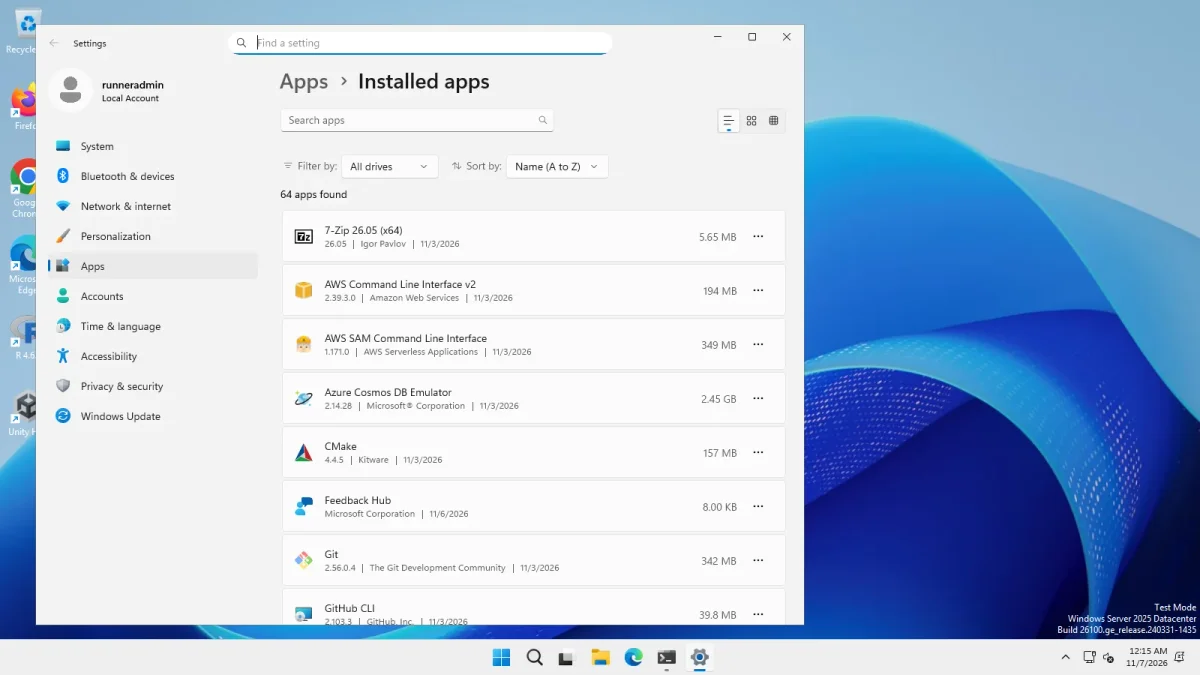
The screenshot below is Settings after an uninstall; the ExplorerPatcher entry is gone from the list.
What it sends over the network
After each install we compared the DNS cache before and after. A DNS cache only lists the names looked up, not what was sent. It also includes lookups made by Windows and by our own test script, which downloaded the setup from GitHub, so we cannot assign every name to EP.
| New names after the install (across our runs) | Likely reason |
|---|---|
release-assets.githubusercontent.com (both machines) |
GitHub’s file host: our test script downloading the setup |
login.live.com, oneocsp.microsoft.com, tas02.sls.update.microsoft.com, ocsp.sectigo.com |
Windows account, update and certificate checks. We did not attribute these to EP. |
Nothing in that list looked unexpected to us, but this is a weak test. For a firmer answer we read the source (ExplorerPatcher 71.1 ExplorerPatcher, ep_gui, ep_setup, ep_weather_host) for every web address. The runtime connections are:
| Connection | When | Source |
|---|---|---|
github.com/valinet/ExplorerPatcher/releases/latest |
The update check, when it runs. Default: “Notify about available updates”. | updates.h, wiki “Configure updates” |
api.github.com/repos/valinet/ExplorerPatcher/releases?per_page=1 |
Only if you opt into pre-releases | updates.h |
| Microsoft’s public symbol server | Once per new Windows build, to learn where functions are | Wiki “Symbols” |
www.google.com/search?...q=weather and some icons on user-images.githubusercontent.com |
Only if you turn the weather widget on | ep_weather_host |
go.microsoft.com/fwlink/p/?LinkId=2124703 |
Only if the weather widget is on and the WebView2 runtime is missing: EP downloads it from Microsoft | utility.c, dllmain.c |
raw.githubusercontent.com/valinet/ep_make/... |
Only if you pick the “Build updates locally” option | updates.cpp |
The limit of this check: ExplorerPatcher’s taskbar DLL (ep_taskbar) is a binary. The wiki says its source cannot be published “for legal reasons”, so we could not read it. Several parts live in separate repositories (git submodules) that were empty in the copy of the source we read: libvalinet, sws (the Simple Window Switcher), zlib, ep_dwm and ep_starttiledata. Our statement is therefore “no tracking address in the code we could read”, not a full audit.
Upstream’s wiki says: “The code does not have any kind of telemetry built-in.” It also explains that the update check increments GitHub’s public download counter, which is why that counter (82,981,120 downloads on 6 Nov 2026) is not a user count.
Why antivirus programs flag it
ExplorerPatcher changes Explorer’s code and memory and puts a DLL named dxgi.dll into C:\Windows. Upstream’s own explanation, from its May 2025 release notes: this is “similar to how some game cheats operate”. Detections are heuristic, not matches to a known virus. Microsoft Defender flagged releases in 2024; upstream says Defender stopped flagging it in October 2025 (release 69.4), and our Defender scans of 71.1 found nothing. The whole timeline, including detections that were still reported in 2026, is on the antivirus page.
Real risks
- Windows updates break it. The biggest cluster of problems upstream is crashes after a Windows update. One example: build 26220.8474 made the 10 taskbar and Start menu crash; the issue “ExplorerPatcher crashes with Windows 11 build 26220.8474” was opened on 16 May 2026 and drew 184 comments (issue 4957). Release 70.1 of 19 May 2026 lists a fix. Upstream says it “typically” releases a fix within a day, but you may be stuck until then. See Windows update status.
- It loads into core Windows processes. The loader runs in
explorer.exe,StartMenuExperienceHost.exeandShellExperienceHost.exe. A bug in EP is a bug in your desktop. After Explorer has quit three times within seconds of starting, EP switches itself off at the next start (details in how it works). - The shell extension option is wider. “Register as shell extension” (off by default) loads EP into every program that shows an Open or Save dialog. The wiki warns that this can make recovery harder.
- It is not code-signed. We checked the signature of every setup file we downloaded: “NotSigned”. The GitHub release is built by GitHub’s infrastructure according to the wiki, and the hash on our page lets you verify the download, but Windows cannot tell you who published it.
- The taskbar code is closed. The reimplemented taskbar (
ep_taskbar) ships as a binary. The main program’s source is public under GPL-2.0. - A small team. The contributor list shows two people with 685 and 371 contributions and none above four after that. GitHub shows 104 releases in 2022 and 9 in 2025 (counting pre-releases).
- Microsoft is not on your side. In 2024 the Windows 11 24H2 setup blocked ExplorerPatcher with a “security or performance issues” message, which a later release worked around (Neowin).
Fake and lookalike sites
The release notes say that GitHub is the only official distribution channel. We opened each of these on 6 Nov 2026:
| Site | Verdict | What we saw | Checked |
|---|---|---|---|
explorerpatcher.app | Avoid | Says it is independent, but its main Download button led to a page on an unrelated domain (a guitar-shop site) titled "OpenSourceTools". | 2026-11-06 |
explorerpatcher.com | Parked | Parked and offered for sale through a domain registrar when we looked. | 2026-11-06 |
explorerpatcher.dev (this site) | Reference | An independent guide. We never host ExplorerPatcher files; every download link goes to GitHub. | 2026-11-06 |
explorer-patcher.com | Caution | A guide and marketing site; its download links pointed to an old release (26100.4946.69.6) when we looked. | 2026-11-06 |
github.com/valinet/ExplorerPatcher | Official | The official project. Releases, source, issues. The release notes state it is the only official distribution channel. | 2026-11-06 |
explorerpatcher.net | Caution | Says it offers the download "directly from our official servers" but also calls itself a reference resource; its buttons pointed to GitHub and it showed 71.1. | 2026-11-06 |
explorerpatcher.org | Caution | Describes itself as the official home. Its download button pointed to the GitHub releases page when we looked. It is not the project's site. | 2026-11-06 |
explorerpatchers.com | Avoid | Hosts its own ep_setup.exe and ep_setup_arm64.exe on its own file domain, labelled version 22621.4317.68.1, a version number that has no matching release in the project. | 2026-11-06 |
If you already downloaded a file somewhere else, do not run it. Check it with the Download Verifier; if the hash does not match any release, delete it.
Privacy in plain words
- No account, no login, no analytics in the part we could read. EP stores settings in
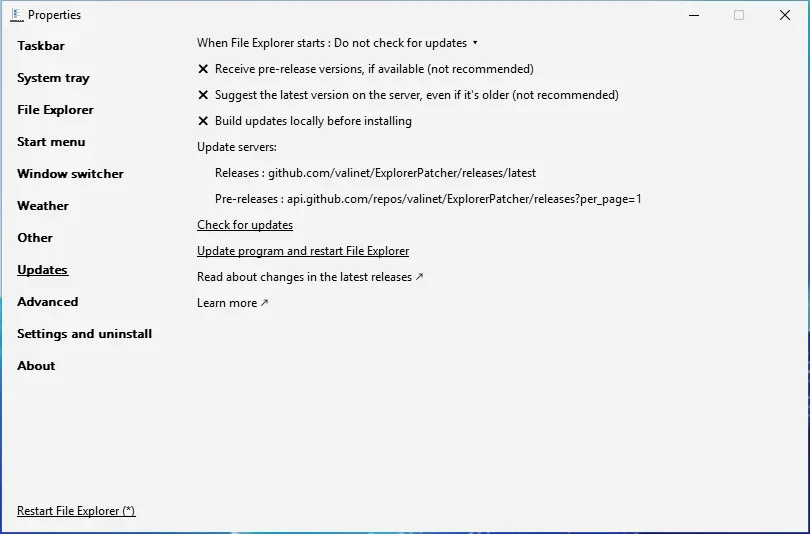
HKCU\Software\ExplorerPatcher. - Updates. With the default “Notify about available updates”, EP checks GitHub’s latest release when Explorer starts. You can set “Do not check for updates” in Properties, Updates. GitHub sees your IP address, as any website would.
- Weather. Off by default. When on, EP’s helper (
ep_weather_host, run in a separate process) shows a cropped Google search page inside Microsoft’s WebView2. If the location field is empty, upstream says the location comes from your IP address. Browser data is kept in%APPDATA%\ExplorerPatcher\ep_weather_host. - Symbols. The download is from Microsoft and asks for files that match your Windows build. You can switch it off under Advanced, but upstream does not recommend it.
Performance, with the method
We measured Explorer on two virtual machines with the same method: restart Explorer, wait 45 seconds, then sample for 30 seconds. We did this before installing EP and with each taskbar style.
| Machine | Explorer memory before EP | EP, Windows 11 taskbar | EP, Windows 10 (EP) taskbar | Idle CPU | Restart until taskbar is back |
|---|---|---|---|---|---|
| Windows 11 25H2, Arm64 | 124 MB | 139 MB | 142 MB | 0 to 0.03 % | 2.8 to 3.2 s (six restarts) |
| Windows Server 2025, 24H2 shell | 145 MB | 153 MB | 111 MB | 0 to 0.03 % | 2 s (six restarts) |
What the numbers allow us to say: there is no meaningful cost for Explorer’s own memory, and a restart with the EP taskbar took about the same time as with the Windows 11 taskbar (within about 0.3 s). What they do not allow:
- The memory is the working set of
explorer.exeonly, not of the Start menu host, tray flyouts or the weather helper. - Two virtual machines on GitHub’s runners, with no real apps, GPU, second monitor or user. Our two runs differed from each other by up to about 30 MB, so differences of that size are noise. The 111 MB result on Windows Server 2025 is lower than the baseline; we cannot explain it and do not claim that EP saves memory.
- We timed restarts only with EP installed, not before installing it.
- We did not measure battery, gaming or logon time.
How to undo it
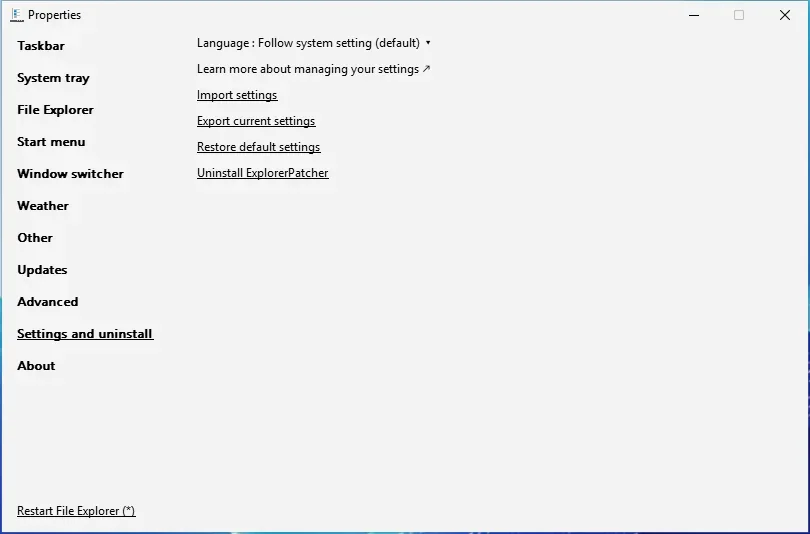
- Uninstall. Properties, Settings and uninstall, “Uninstall ExplorerPatcher”; or Settings, Apps; or
ep_setup.exe /uninstall. In our test the two dialogs appeared and the Windows 11 taskbar was back after 15 s (Windows Server 2025) and 22 s (Arm64). Our uninstall guide has the details. - What stays. The settings key
HKCU\Software\ExplorerPatcherstayed on both machines, by design: reinstalling keeps your settings. On Arm64 we also found%APPDATA%\ExplorerPatcher\cleanup\*.tmp. The cleanup script on the uninstall page removes both. - If the screen is black. Follow the black screen guide. We tested the Ctrl+Alt+Shift method: Explorer started with the Windows 11 taskbar (48 px) and EP off, along with EP’s own crash message.
- Before you install. A system restore point or a backup is a sensible extra step. We did not test restore points.
For the methods behind these tests, see how we test.
More short answers are in the ExplorerPatcher FAQ.
Common questions
Is Explorer Patcher safe to use in 2026?
On a personal PC, from GitHub, with the hash checked, yes in our tests of 71.1 on Windows 11 25H2 Arm64 and Windows Server 2025. The real risk is not malware but Windows updates that break Explorer until a new release arrives. Know the Ctrl+Alt+Shift recovery before you install.
Why does my antivirus say ExplorerPatcher is a virus?
It patches Explorer in memory and puts a dxgi.dll in C:\Windows, which is also how malware and game cheats work, so heuristics flag it. Upstream says Defender stopped flagging it in October 2025, but other products still may. See the antivirus page for the timeline.
Does ExplorerPatcher spy on me or send data?
Upstream states the code has no telemetry, and the source files we read contain no analytics address. It does contact GitHub for updates and Microsoft for symbol files, and the optional weather widget loads a Google page. We list each connection on this page.
Does ExplorerPatcher slow down Windows?
Not in our measurements. After a restart and a 45 second wait, Explorer used 124 MB without EP and 139 to 142 MB with it on Arm64, and 145 MB without and 111 to 153 MB with it on Windows Server 2025, with idle CPU near zero. Two virtual machines are not your laptop, so treat it as a rough guide.
How do I get rid of ExplorerPatcher if something goes wrong?
Start Explorer from Task Manager with Ctrl+Alt+Shift held, then uninstall it from Settings, Apps. We tested both. The uninstall took 15 to 22 seconds and brought back the Windows 11 taskbar, but it kept the settings key in the registry.