How ExplorerPatcher works
ExplorerPatcher puts its own dxgi.dll next to explorer.exe and two other Windows shell programs, so Windows loads it at start. Inside those processes it hooks functions it finds with Microsoft's symbol files, and on Windows 11 24H2 and later it swaps in its own copy of the Windows 10 taskbar (ep_taskbar). Windows files are not replaced, and a crash counter switches it off if Explorer keeps failing.
Checked against ExplorerPatcher 71.1 (26100.9711.71.1) on Windows Server 2025 (24H2 shell) 26100.33674 and Windows 11 Enterprise 25H2 26200.9725 · Nov 6, 2026On this page
The parts, exploded
Everything ExplorerPatcher does starts when Windows loads one DLL. The diagram shows how that DLL reaches three Windows programs, what it needs, and what it starts. It comes from upstream’s source code (71.1) and our install test; where the two differ, we say so.
Read it from top to bottom:
- Three Windows programs are involved:
explorer.exe(desktop, taskbar, File Explorer),StartMenuExperienceHost.exe(the Start menu) andShellExperienceHost.exe(tray flyouts such as network and battery). The wiki says these are the only processes EP injects by default. - A loader named
dxgi.dllsits in each program’s folder. It is the same file three times. - The core is that file’s real code. It reads your settings, hooks functions, and forwards the normal graphics calls to Windows’ own
dxgi.dll. - Symbols are Microsoft’s debug files that tell the core where functions are in your Windows build.
- Helpers are extra programs for the Properties window, the taskbar, the weather widget, the rounded-corners service and the Windows 10 Start tiles.
- Settings are in the registry under
HKCU\Software\ExplorerPatcher.
The loader: how dxgi.dll gets in
Upstream’s wiki describes the method in one phrase: ExplorerPatcher injects the three programs “by exploiting the DLL search order”. The wiki page that explains how it works is a placeholder, so here is what the source and our test show.
- Where the files go. The setup copies the loader to
C:\Windows\dxgi.dlland to the folders ofStartMenuExperienceHostandShellExperienceHostunderC:\Windows\SystemApps. We saw all three after install, at 621 KB each on x64 and 894 KB on Arm64. - Why Windows loads it. When a program asks for
dxgi.dll(the DirectX graphics library), Windows searches for it. For a DLL that is not on the system’s protected “known DLLs” list, the folder the program started from is searched beforeSystem32.explorer.exelives inC:\Windows, so it finds EP’s file first. This is Microsoft’s documented search order; thatdxgi.dllis not protected is our inference from the fact that the method works. - How EP takes over. In the source, the loader exports the same functions as the real library. For
explorer.exe, EP starts when Windows calls the exportedDXGIDeclareAdapterRemovalSupport. For the two Start and flyout hosts it starts atCreateDXGIFactory1. At that point the code compares the program’s full path with the expectedC:\Windows\explorer.exeand the twoSystemAppspaths, and ignores anything else. - The forward. Every other DXGI function is passed to the real library: the loader opens
System32\dxgi.dllby full path and forwards the call (dxgi_imp.cpp). Programs that use DirectX keep working. - When it stays out. EP does not start hooks in Windows Safe Mode (
SM_CLEANBOOT) or while Windows is in first-run setup or credential reset (dllmain.c). That should make Safe Mode a workable place to uninstall it, though we did not test that. - A second proxy for Start. On Windows 11 the setup also puts a DLL named
wincorlib.dllin the Start menu host folder. It is EP’sep_startmenu.dll, and it passes calls to a link namedwincorlib_orig.dllthat points at Windows’ own copy. - Optional: every program. “Register as shell extension” (off by default) loads EP into every program that shows an Open or Save dialog. The wiki says to avoid it unless you need it.
Symbols: how EP finds Windows’ functions
Windows’ shell DLLs do not list where their functions start. Microsoft publishes symbol files (.pdb) for its public builds, and those files do. EP downloads them and reads the addresses. Without them, features that call into twinui.pcshell.dll (the Win+X menu, some context menu styling, the Windows 10 Alt+Tab) or StartDocked.dll (open Start at All apps) could not work, according to the wiki.
- When. When Explorer starts, EP uses data cached in the registry or built into the release. If it has neither, it downloads the files from Microsoft’s public symbol service, extracts the data and caches it. “Enable symbols download” is on by default under Properties, Advanced.
- What you see. A notification such as “Downloading symbols for OS build …, please wait”, then “Successfully downloaded symbols” (strings from
ep_gui.en-US.rc). It records the last build inSymbolsLastNotifiedOSBuild. - What it left on our machines. Within 30 seconds of install,
%APPDATA%\ExplorerPatcherheld 4 files on Windows Server 2025 (explorer.pdb,StartDocked.pdb,StartUI.pdb,twinui.pcshell.pdb, 92 MB) and 3 on Windows 11 25H2 Arm64 (the same withouttwinui.pcshell.pdbwithin 120 seconds, 65 MB). - Why a new Windows build needs a new release. Symbols exist only for some builds. The wiki says Microsoft publishes them for the monthly stable (“B”) builds and Dev channel builds, not for optional preview (“C” and “D”) builds or Beta and Release Preview builds. That is one reason preview and Insider builds can fail.
- Why releases name their builds. Each release lists “Tested on OS builds …”. Builds listed there use data built into the release and need no download.
If the download fails the program still starts, but those features are missing. Use Troubleshooting if a notification says it failed.
The reimplemented taskbar (ep_taskbar)
Windows 11 up to 23H2 still contained the Windows 10 taskbar, and EP could switch it on. Microsoft removed it in builds from 26002 on (our research notes cite EP’s own changelog). EP’s answer is ep_taskbar: its own implementation of the Windows 10 taskbar, “mostly based on the code present in Windows 11 22H2” according to the wiki.
- What it looks like. In our tests the taskbar style “Windows 10 (ExplorerPatcher)” gave a 40 px taskbar. The Windows 11 style and the style named “Windows 10” both left the 48 px Windows 11 taskbar, on both Windows 11 machines. See taskbar not changing.
- One DLL per Windows family. In the setup source the variants are
ep_taskbar.rs2.dll,.fe.dll,.co.dll,.ni.dll,.zn.dlland.ge.dll; the setup installs only the one that fits your build. A 70.x release renamed them from numbers to codenames of the first release a variant supports; for 24H2 and 25H2 the file isep_taskbar.ge.dll(formerlyep_taskbar.5.dll). We foundep_taskbar.ge.dllon both Windows 11 machines. - Closed source. The wiki says that “due to legal reasons” it cannot publish the taskbar’s source. Binaries and symbol files are released in a separate repository.
- Loaded when you choose it. In the code, the taskbar part loads for the style “Windows 10 (ExplorerPatcher)”. With the Windows 11 taskbar it loads the DLL “as a data file” for the classic context menu. Two other options (a classic Start launcher and an audio flyout style) also use the DLL.
- Compatible add-ons. The wiki lists tools such as TranslucentTB and many Windhawk mods as compatible, and 7+ Taskbar Tweaker as not.
The wiki’s warning applies: a Windows update can break it until a new release. See Windows update status and compatibility.
The helpers
| File | What it is | Evidence |
|---|---|---|
ep_gui.dll |
The Properties window. Opened by Start’s “Properties (ExplorerPatcher)” shortcut, which runs rundll32 ... ep_gui.dll,ZZGUI. |
Setup source; our Properties window screenshots (up to 12 sections) |
ep_weather_host.dll and ep_weather_host_stub.dll |
The weather widget. Registered with regsvr32 by the setup and run by Windows’ COM surrogate in a separate process. It shows a cropped Google search page in WebView2. |
Setup source; wiki “Weather”; weather |
ep_dwm_svc.exe |
A Windows service that turns off rounded corners. It is created by the Properties window with a request for admin rights, not by the setup. In our default install no new service appeared. | utility.c; our footprint diff |
ep_starttiledata.dll |
A copy of Start tile code loaded from the install folder; the 70.x notes describe a rebuilt Windows 10 Start tile layout engine. It is built from a separate repository. | dllmain.c, build.proj, release notes |
ep_startmenu.dll |
Installed as wincorlib.dll for the Start menu host (see above) |
Setup source |
ep_extra.dll (optional) |
A hook for your own DLL: if you place ep_extra.dll in C:\Windows, EP loads it. Not installed by default. |
ep_extra/README.md |
ep_setup.exe |
The installer and uninstaller. A copy stays in C:\Program Files\ExplorerPatcher and runs the uninstall. |
Our footprint |
The setup also accepts /uninstall, /uninstall_silent, /update_silent and /extract (to unpack the files without installing).
The crash counter and the safe start
EP guards itself so that a bad Windows update does not leave you without a desktop. The code (CrashCounterHandleEntryPoint in dllmain.c) works like this:
- Each time
explorer.exestarts, EP increments the valueCrashCounterinHKCU\Software\ExplorerPatcher. - A timer resets
CrashCounterto 0 once Explorer has run for 10 seconds (CrashThresholdTime, default 10,000 ms). - If the counter has already reached 3 (
CrashCounterThreshold, default 3) when Explorer starts, EP does not hook anything. It sets the counter to 0 and shows a dialog (IDS_CRASH_TITLE): “Unfortunately, File Explorer is crashing :(”. EP stays off until Explorer is restarted. - Ctrl+Alt+Shift held while Explorer starts takes exactly the same branch. That is why the recovery method in the project’s FAQ works, and why it shows the same crash message although nothing crashed.
We tested the method on both Windows 11 machines: Explorer started with the stock 48 px taskbar, EP showed the dialog, and a normal restart brought back the 40 px EP taskbar. CrashCounter was 0 afterwards.
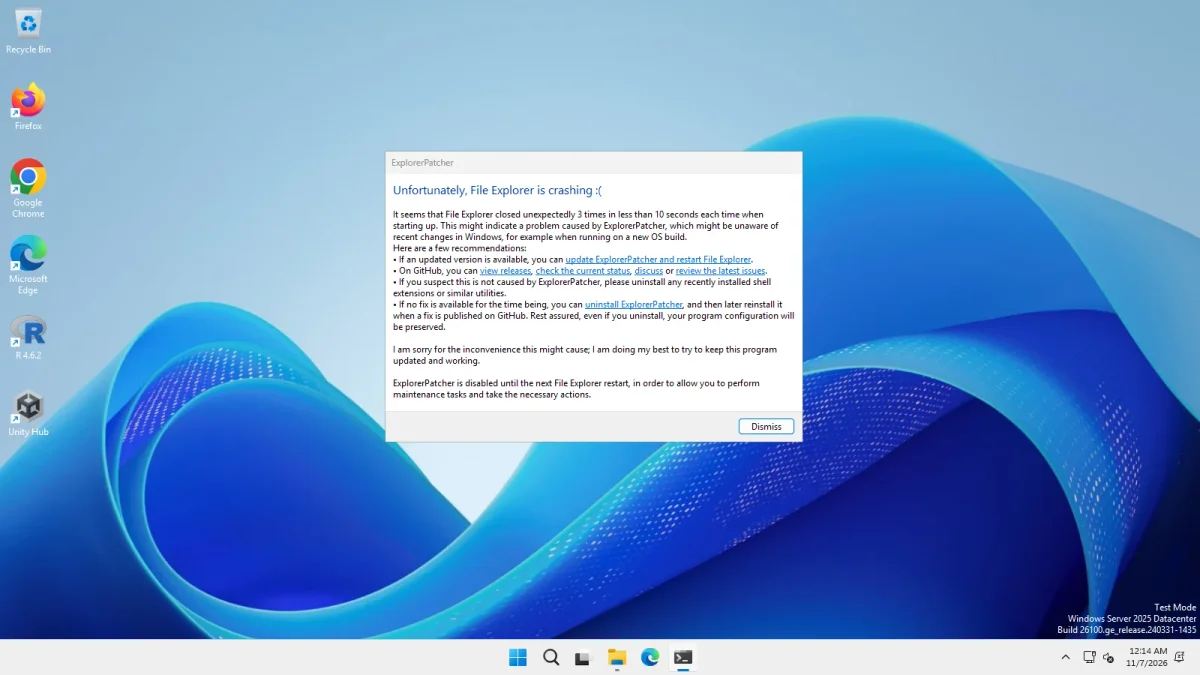
The code also reads CrashCounterDisabled, CrashCounterShowMessage, CrashCounterThreshold (2 to 9) and CrashThresholdTime (100 to 60,000 ms) from the same key. They are not in the Properties window and we have not tested changing them. The step-by-step version is in the black screen guide, and Explorer crashing covers the dialog.
Source code map
The upstream repository (valinet/ExplorerPatcher) has 15 top-level folders. We opened the copy at version 71.1 (version.h: 26100.9711.71.1). Folders marked “submodule” were empty in our copy because they point to other repositories (.gitmodules).
| Folder | What is in it | What we checked |
|---|---|---|
ExplorerPatcher/ |
The core DLL. dllmain.c (14,085 lines) holds the loader entry points, hooks and the crash counter. Also symbols.c, updates.cpp, Taskbar10.cpp, StartMenu.c, dxgi_imp.cpp. Built as ExplorerPatcher.amd64.dll, .arm64.dll and .IA-32.dll. |
Read the parts cited here |
ep_gui/ |
The Properties window (GUI.c) and its resources: settings.reg (Windows 11), settings10.reg (Windows 10) and lang/ep_gui.en-US.rc (English strings) |
Read; basis of our settings pages |
ep_setup/ |
The installer: ep_setup.c and a Rijndael (AES) source file |
Read |
ep_setup_patch/ |
A build tool that opens the finished setup and writes the main DLL’s hash into it, which the update check compares (wiki “Configure updates”) | Read the first part |
ep_startmenu/ |
The wincorlib.dll proxy for the Start menu host |
Read |
ep_weather_host/ |
The weather COM server: Google page and script, error page | Read |
ep_weather_host_stub/ |
The interface definition (.idl) for the weather host |
Listed only |
ep_extra/ and ep_extra_valinet.win7alttab/ |
The optional chainloader for your own DLLs, and a Windows 7 Alt+Tab module | Read the READMEs |
ep_generate_release_name/ and ep_generate_release_description/ |
Build helpers that print the version and release text | Listed only |
ep_dwm/ (submodule) |
Empty here. The setup source says ep_dwm.exe was renamed ep_dwm_svc.exe “due to Microsoft imposing 24H2 upgrade blocks”. |
Could not read |
ep_starttiledata/ (submodule) |
Empty here. build.proj builds it for x64 and Arm64. |
Could not read |
libs/ (submodules) |
libvalinet, sws (the Simple Window Switcher) and zlib |
Could not read |
ExplorerPatcher-L10N/ (submodule) |
Translations of the Properties window, setup and crash dialog | Read in a separate copy |
The root also holds build.proj, ExplorerPatcher.sln, CHANGELOG.md, LICENSE (GPL-2.0) and FUNDING.yml. According to the wiki, public releases are built on GitHub Actions and never on the developer’s computer, and every build produces an archive that includes dxgi.dll and symbol files.
What we have not verified
- We did not read the source of
ep_taskbar(not published),ep_dwm,ep_starttiledataand the libraries inlibs/. - We tested the loader on Windows Server 2025 (24H2 shell) and Windows 11 25H2 on Arm64 only. Windows 10 follows a different code path (
settings10.reg); our Server 2022 run showed the stock Windows 10 taskbar in every style. - The DLL search order explanation above is Microsoft’s general rule plus the wiki’s one-line description, not something we measured with a debugger.
For a plain-language view of the risks, go to Is ExplorerPatcher safe?. To change settings, use the Configurator or the settings reference.
Common questions
Does ExplorerPatcher replace explorer.exe or other Windows files?
No. It adds its own files beside Windows' files and patches functions in memory while Explorer runs. In our install test 32 to 33 entries were added and none removed from the lists we compared. We did not hash Windows' own files before and after.
Why does ExplorerPatcher download symbol files?
Symbol files tell it where Windows' internal functions are in your exact build, which it needs for things like the Win+X menu and the Windows 10 Alt+Tab. In our runs it fetched three to four files of 65 to 92 MB into %APPDATA%\ExplorerPatcher within 30 seconds.
What is the File Explorer is crashing message?
It is ExplorerPatcher's crash protection. If Explorer quit three times within about 10 seconds of starting, or you started it with Ctrl+Alt+Shift held, EP shows the message and stays off until the next Explorer restart. We saw it on both Windows 11 machines.
Where is the source code?
At github.com/valinet/ExplorerPatcher under GPL-2.0, with some parts in separate repositories. The reimplemented taskbar (ep_taskbar) is the exception: upstream says its source cannot be published, and only binaries and symbol files are released.