ExplorerPatcher on ARM64 PCs
ExplorerPatcher has a native Arm64 build: download ep_setup_arm64.exe from the GitHub release page. We installed version 71.1 on Windows 11 Enterprise 25H2 build 26200.9725 (Arm64). The taskbar, Windows 10 Start menu, Alt+Tab styles and File Explorer ribbon worked on screen. The machine is an Arm64 cloud VM (Cobalt 100), not a Snapdragon laptop.
Checked against ExplorerPatcher 71.1 (26100.9711.71.1) on Windows 11 Enterprise 25H2 26200.9725 and Windows Server 2025 (24H2 shell) 26100.33674 · Nov 6, 2026On this page
What to do on an Arm64 PC
- Check your CPU type: Settings, System, About, System type. “ARM-based processor” means you need the Arm64 file.
- Download
ep_setup_arm64.exefrom the GitHub release page. The 71.1 file is 12,013,056 bytes. Compare its SHA-256 with28891243b046d310f5401b21bd480b900dfd4f80812c7c0c1357ba9c7d3237ba, which we computed on the Arm64 test machine, using the Download Verifier. - Do not use winget. Its package has no Arm64 installer.
- Switch off Smart App Control, install on a personal PC only, and read the black screen recovery first.
What we tested
| Check | Result |
|---|---|
| Install, version 70.3 (first) | 8.6 seconds |
| Update to 71.1 by running the new setup over it | 6.6 to 6.7 seconds; settings kept |
| Defender scan of the setup and the installed files | Nothing found |
| Code signature of both setup files | Not signed (the same as the x64 files) |
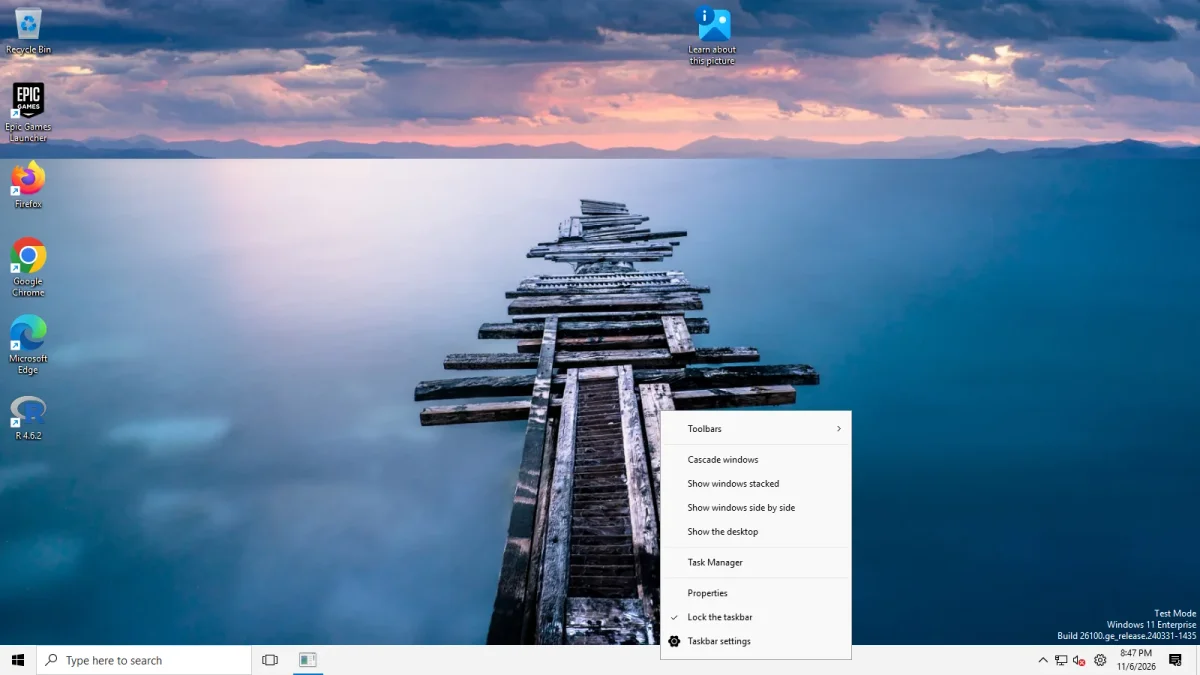
| Taskbar after install | 40 px Windows 10 taskbar (Windows 11’s is 48 px) |
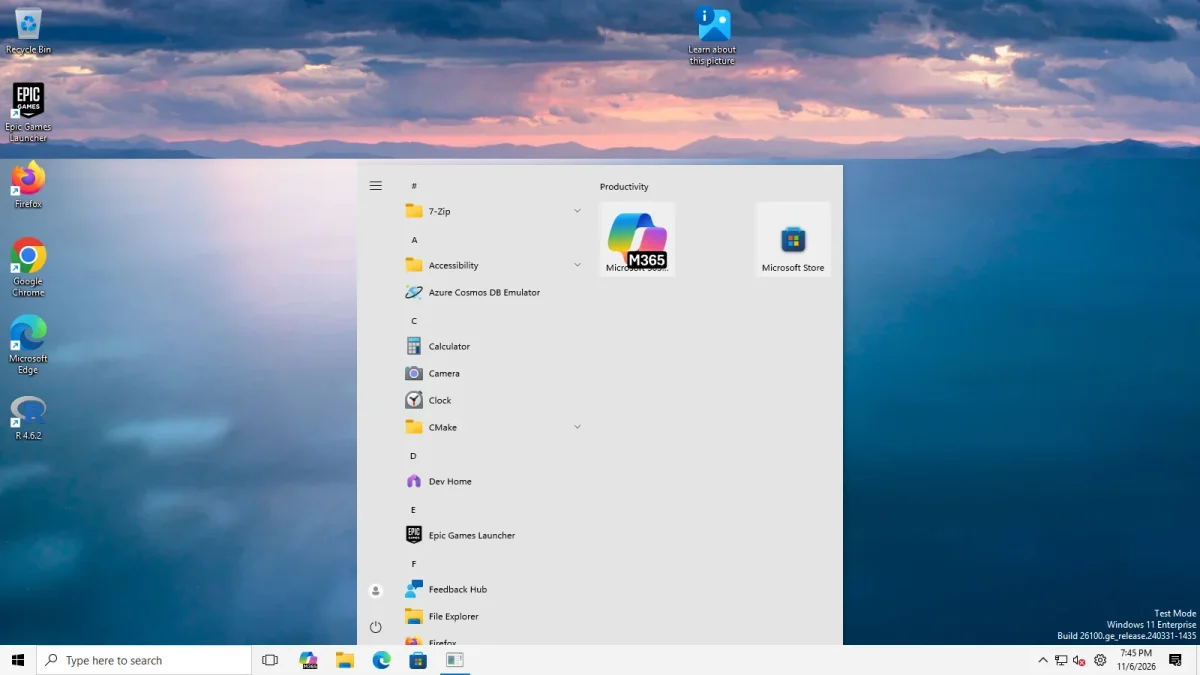
| Windows 10 Start menu | Worked with both taskbars |
| Taskbar options we tried | All worked, including top, left and right |
| Alt+Tab styles | Windows 10 (dark bar) and Simple Window Switcher (grid) worked; “Windows NT” showed no switcher (Windows removed it in 24H2) |
| File Explorer | Windows 10 Ribbon and Windows 7 Command Bar worked; the classic Address Bar choice looked like the default |
| File Explorer search switches | “Disable modern search bar” showed no visible change; “Hide search bar completely” removed the box with the Ribbon and not with the command bar (not confirmed) |
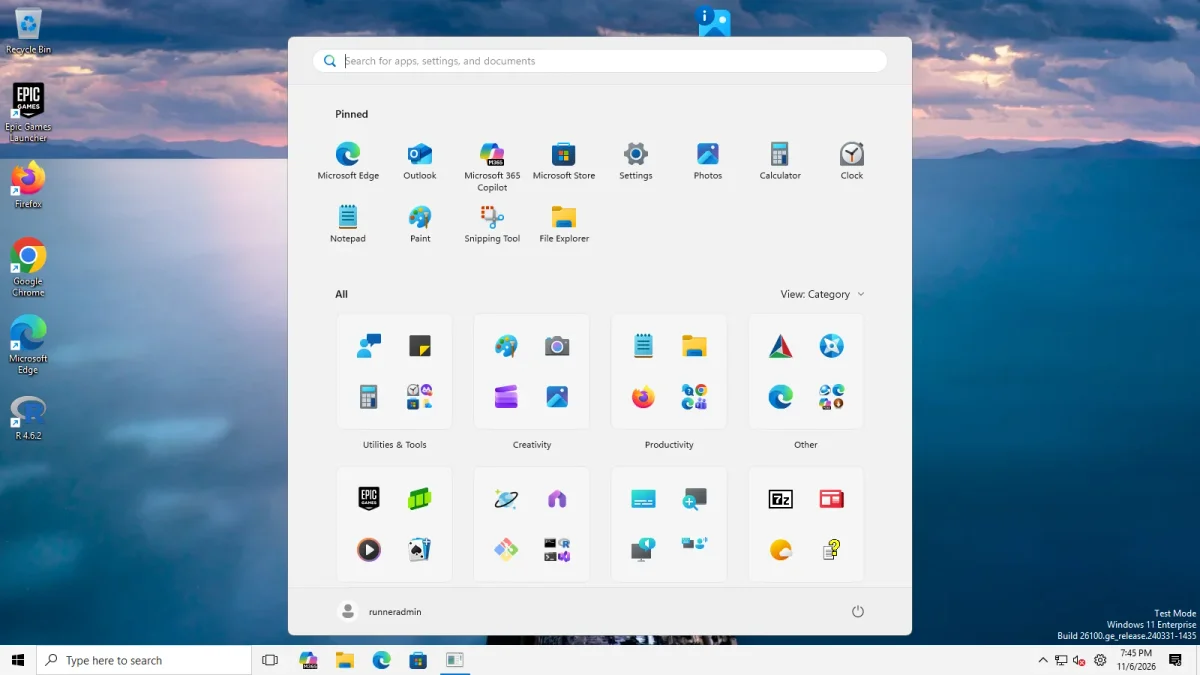
| Start menu: Recommended | Not demonstrable: the 25H2 Start has no Recommended block |
| Weather widget | ExplorerPatcher’s weather widget, switched on with the Windows 10 (ExplorerPatcher) taskbar, showed “7 °C Mostly cloudy” with an icon in our capture. The Windows 11 taskbar shots show Windows’ own widget at the left instead, for example “60°F Cloudy” in the Start menu photo. That is not ExplorerPatcher’s widget, which upstream says needs a Windows 10 taskbar style. Upstream says Google picks the place from the machine’s IP address, so temperatures differ by location and time. See weather |
| Ctrl+Alt+Shift recovery | Worked; EP’s crash dialog appeared, as expected |
| Uninstall | 21.7 to 22 seconds; settings key and cleanup .tmp files in %APPDATA%\ExplorerPatcher\cleanup left behind |
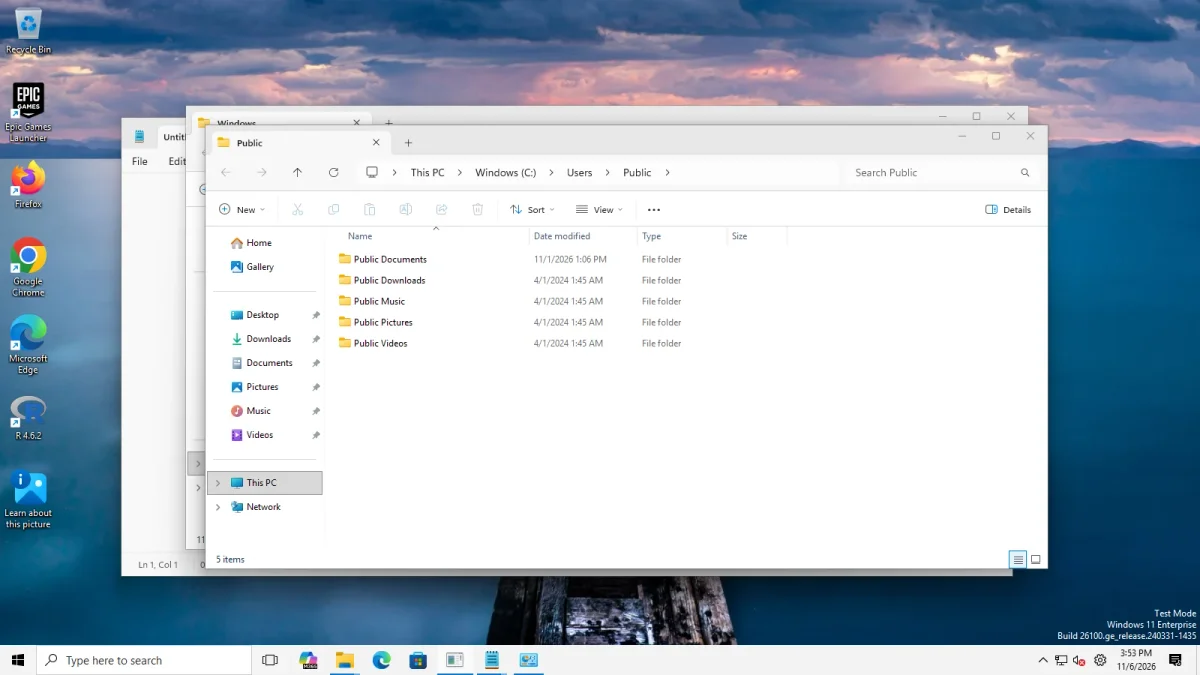
Start menu, Alt+Tab and File Explorer on Arm64
These three used to be missing here. On 7 Nov 2026 we re-ran them on the Arm64 machine after our harness learned to close Windows’ first-run privacy page, which had covered the File Explorer pictures. The pictures below are from that re-run and show the real screen. The values were set in the registry, not clicked in Properties.
Start menu. The Windows 10 Start menu opened with ExplorerPatcher’s taskbar (app list on the left, tiles on the right) and with the Windows 11 taskbar. With the Windows 11 Start selected, the 25H2 client shows Pinned apps and an All grid, and no Recommended block at all, so “Disable the Recommended section” has nothing to remove on this machine. It worked on Server 2025, see Start menu settings.
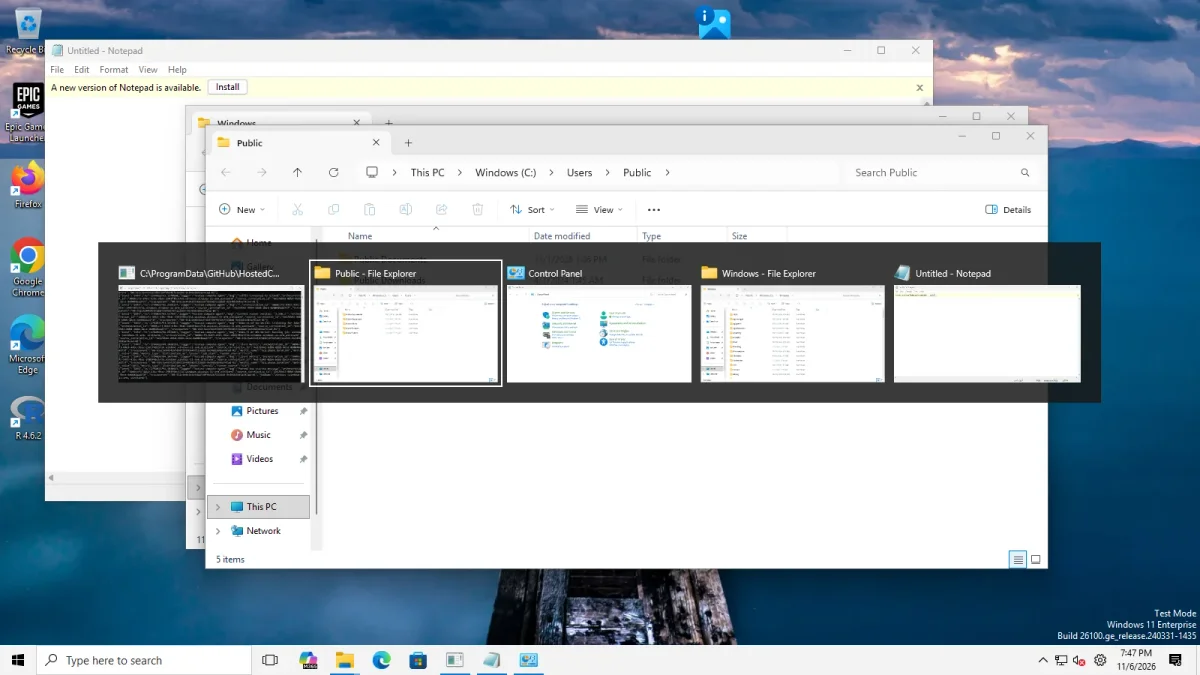
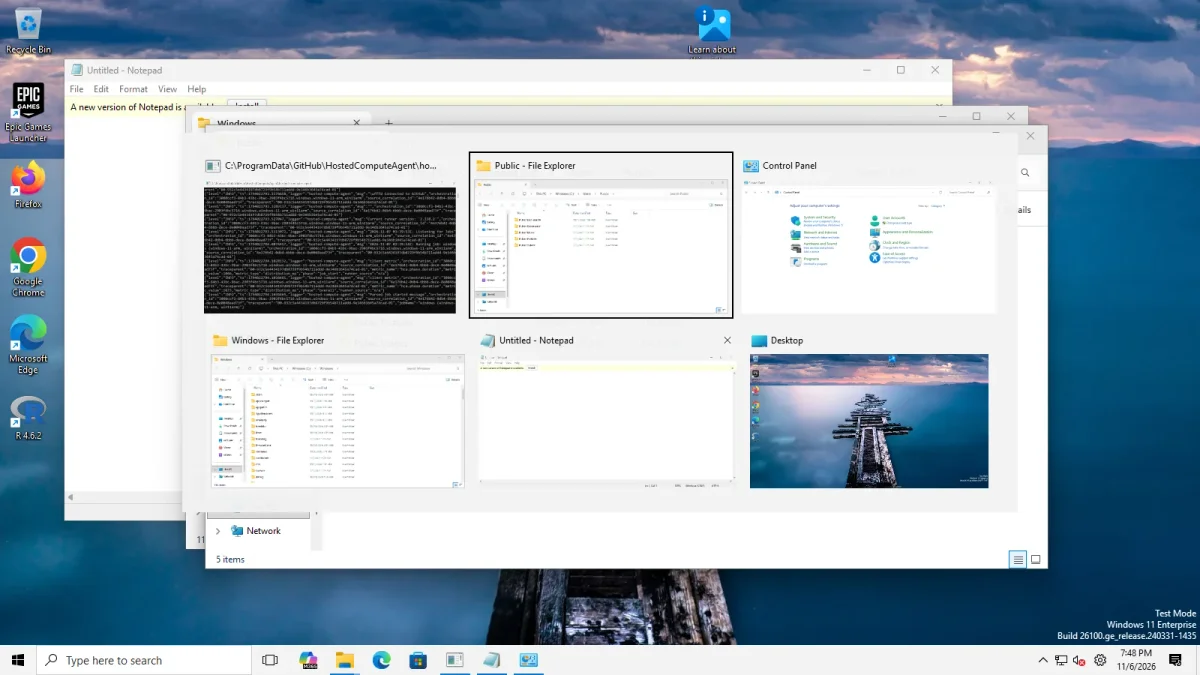
Alt+Tab. The Windows 10 style gave a dark bar with a title above each thumbnail, and Simple Window Switcher gave a grid of large thumbnails in two rows. With the Windows NT style we pressed Alt+Tab and no switcher appeared. The Windows 11 style is Windows’ own light card. Details are in window switcher settings.
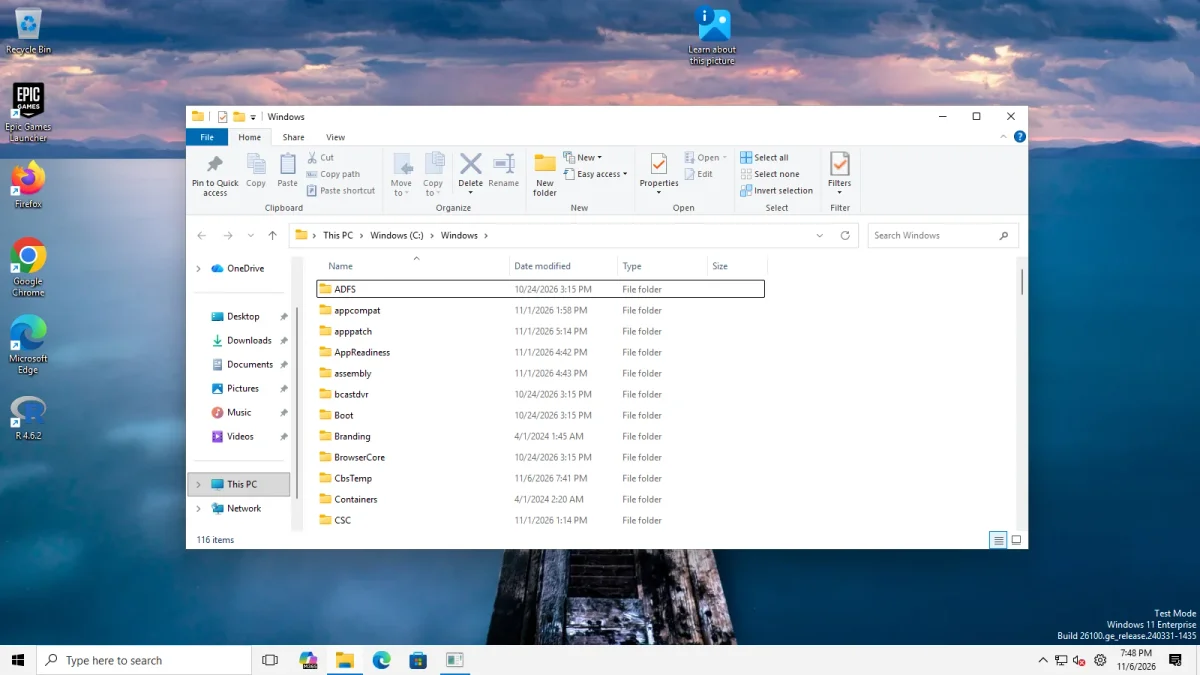
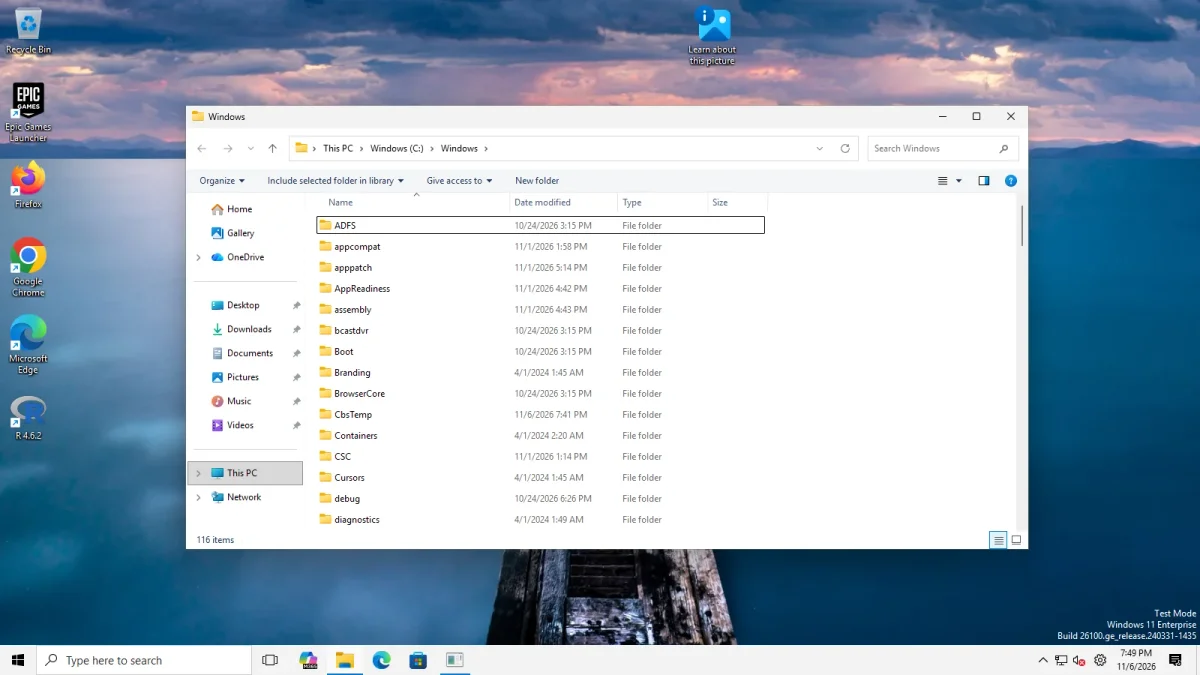
File Explorer. Control Interface set to Windows 10 Ribbon showed the File, Home, Share and View tabs, and Windows 7 Command Bar showed Organize, Give access to and New folder. “Windows 11 Command Bar (classic Address Bar)” looked like the default. The search switches changed little: with the Windows 11 command bar the search box stayed for both “Disable modern search bar” and “Hide search bar completely”. With the Ribbon, the modern search switch changed nothing we could see, and “Hide search bar completely” removed the box in our Arm64 picture. The same switch gave inconsistent results on Server 2025, so we do not confirm it. See File Explorer settings.
What differs from x64
- Files: the Arm64 setup installs ExplorerPatcher’s Arm64 DLL under the name
dxgi.dll, in the same three places as on x64 (C:\Windowsand two system app folders), according to the setup source. In our footprint comparison, an Arm64 install registered 4 COM class IDs and an x64 install 2. - Symbols: within 120 seconds the Arm64 machine had downloaded three symbol files (65 MB). The x64 server had four files (92 MB), including
twinui.pcshell.pdb, which had not arrived on Arm64 in that time. We do not know whether it was still loading or not needed. - Size:
ep_setup_arm64.exeis 12,013,056 bytes andep_setup.exe12,336,128 bytes. - Downloads: in our 6 Nov 2026 snapshot the Arm64 file had 7,072 downloads and the x64 file 555,646. Fewer downloads suggest fewer users, so the Arm64 build may get less field testing.
Arm64 numbers next to x64
Different machines, different Windows editions. Read these as two data points, not a benchmark.
| Measure | Arm64 (Windows 11 25H2) | x64 (Server 2025, 24H2 shell) |
|---|---|---|
| Explorer restart to taskbar | 2.8 to 3.7 s | 2.0 to 2.1 s |
| Settled Explorer memory before EP | 124 MB | 145 MB |
| With EP, Windows 11 taskbar | 139 MB | 153 MB |
| With EP, Windows 10 (EP) taskbar | 142 MB | 111 MB |
| Idle CPU | about 0 % | about 0 % |
What upstream says about Arm64
The 71.1 release notes (29 Oct 2026) bring many Windows 10 Start menu, Alt+Tab and Win+X fixes to Arm64, including Start menu startup crashes on 28000.2630 and later, and Win+X and IME menu fixes on 28000.2630 and 29634 and later. The 70.3 notes list Arm64 builds 26100.6899 and 28000.2269 as tested. An open issue from 2 Nov 2026 (5229) reports a missing Start menu closing animation on build 28000.3365 (Arm64). We have not reproduced it.
Everything else on this site about taskbar options and Start menus applies to Arm64 as well, because it is the same ExplorerPatcher with a different build of the DLL. See Windows 11 25H2 and the install guide.
Common questions
Does ExplorerPatcher run on Snapdragon and Copilot+ PCs?
There is a native Arm64 setup file, ep_setup_arm64.exe, and upstream's 71.1 notes list an Arm64 build (26100.8037) as tested. Our own test used an Arm64 cloud VM with a Cobalt 100 chip, so we have not tested a Snapdragon laptop.
Can I install the x64 file on an Arm64 PC?
Use the Arm64 file. ExplorerPatcher injects a DLL into Explorer, and the project ships a separate Arm64 DLL for that. We did not try the x64 setup on Arm64, so we cannot say what would happen.
Does winget have an Arm64 version of ExplorerPatcher?
No. On 6 Nov 2026 the winget package valinet.ExplorerPatcher listed version 26100.9711.71.1 with an x64 installer only. On a Snapdragon PC, download the Arm64 file from the GitHub release page instead.
Is ExplorerPatcher slower on Arm64?
Not in our measurements. After a restart Explorer reached its taskbar in 2.8 to 3.7 seconds on the Arm64 VM with and without ExplorerPatcher, and its memory use changed by about 15 to 18 MB. These are numbers from one cloud VM, not from a laptop.