How to get the Windows 10 Start menu on Windows 11
With ExplorerPatcher 71.1, open Properties, go to Start menu and set Start menu style to Windows 10. We opened the Windows 10 Start menu on Windows Server 2025 (24H2 shell) and Windows 11 25H2 on Arm64, with both the Windows 11 and the ExplorerPatcher taskbar. Microsoft removed the code behind it in builds 26xxx.8474 and later, so ExplorerPatcher now ships its own tile engine, which upstream calls a partial restoration.
Checked against ExplorerPatcher 71.1 (26100.9711.71.1) on Windows Server 2025 (24H2 shell) 26100.33674 and Windows 11 Enterprise 25H2 26200.9725 · Nov 6, 2026On this page
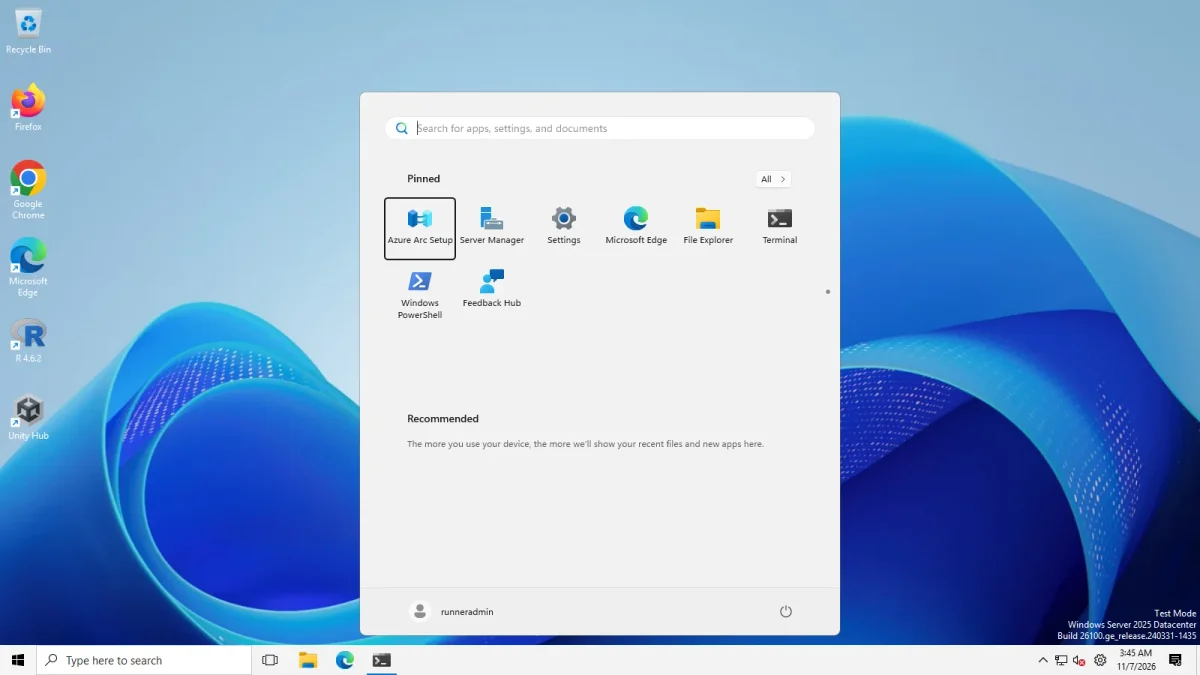 Windows 10 Start (ExplorerPatcher)Windows 11 Start
Start menu with the ExplorerPatcher taskbar, Windows Server 2025 (24H2 shell) · Windows Server 2025 (24H2 shell), x64 26100.33674 · EP 71.1
The tiles in this picture are the default layout of a fresh Server image, a Windows Server group. They are not a migrated Windows 10 layout.
Switch the Start menu style
- Install a current version. Use the download page and read the install guide. Version 71.1 is current.
- Open Properties. Right-click the taskbar and choose Properties, or search Start for Properties (ExplorerPatcher).
- Open the Start menu section and set Start menu style * to Windows 10.
- Restart File Explorer with the link at the bottom of the window, then press the Windows key.
The setting is Start menu style. It has two choices, Windows 11 (default) and Windows 10, and ExplorerPatcher’s own data says it shows only when the build can display the Windows 10 Start menu.
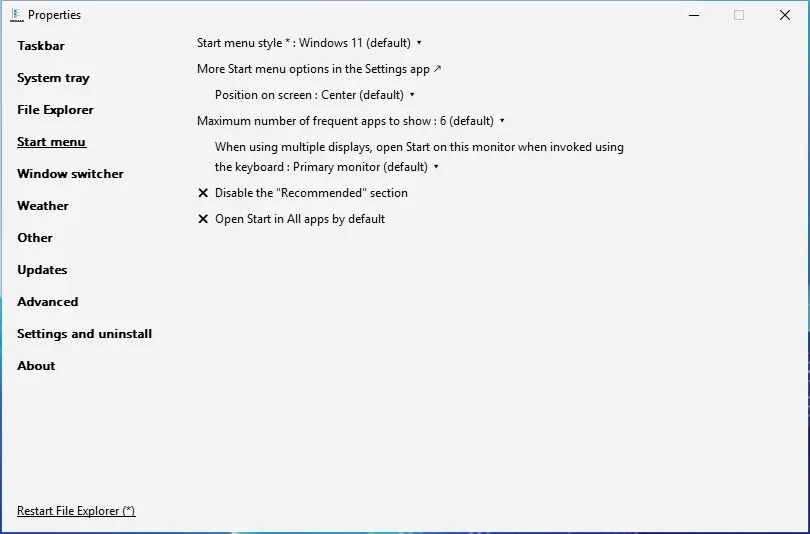
What we tested
We set the value, restarted Explorer, restarted the Start menu process and photographed Start for each combination. All four opened the Windows 10 layout, with the app list on the left and tiles on the right.
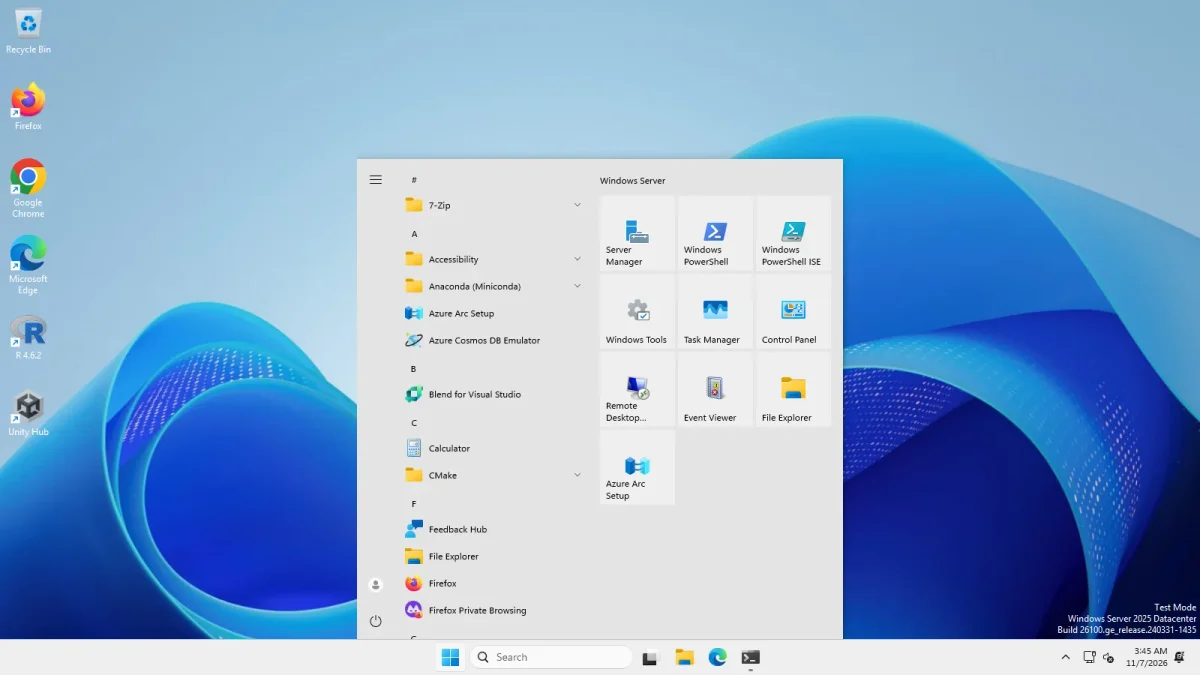
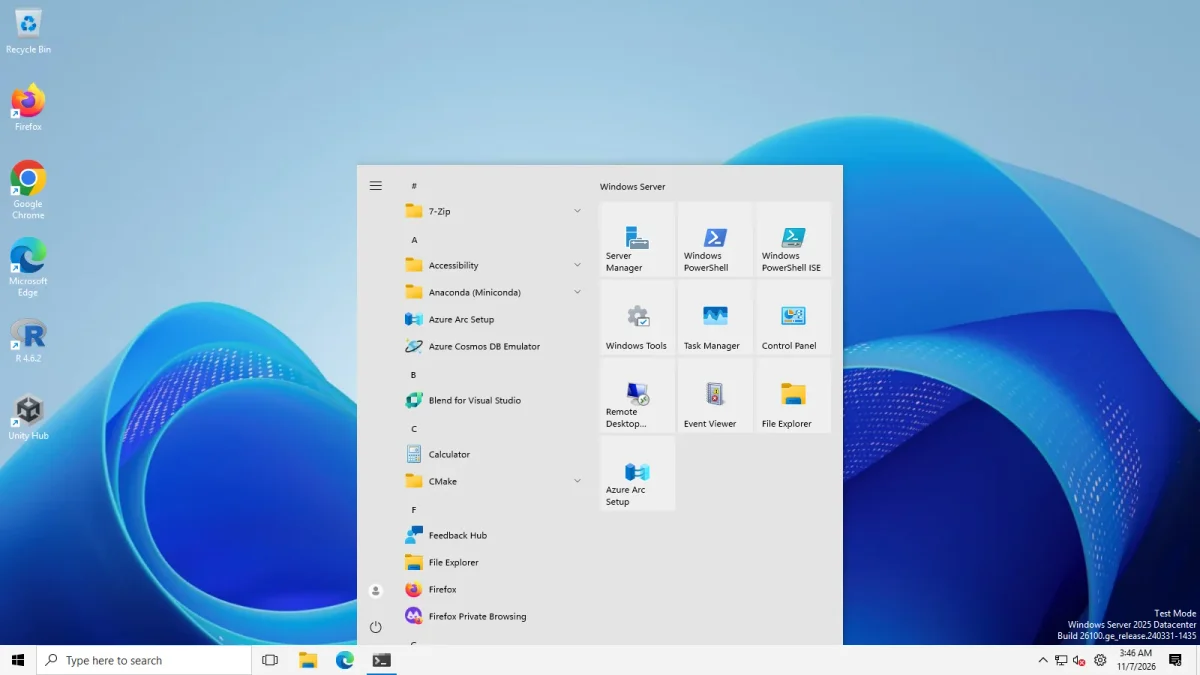
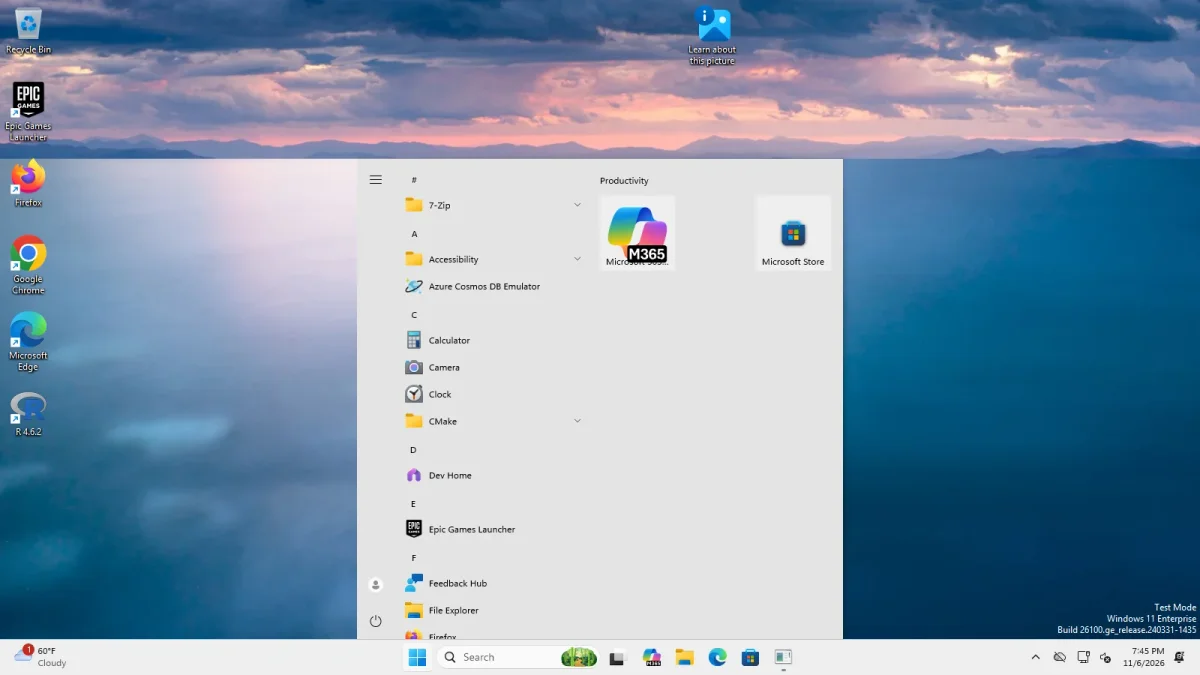
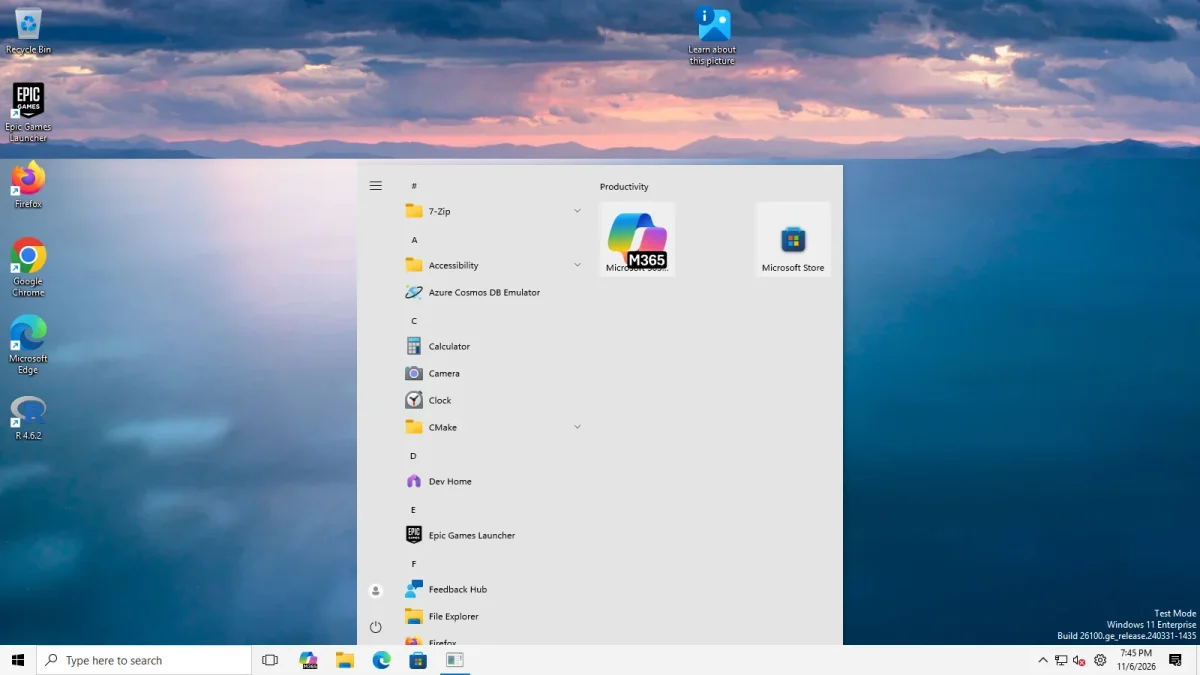
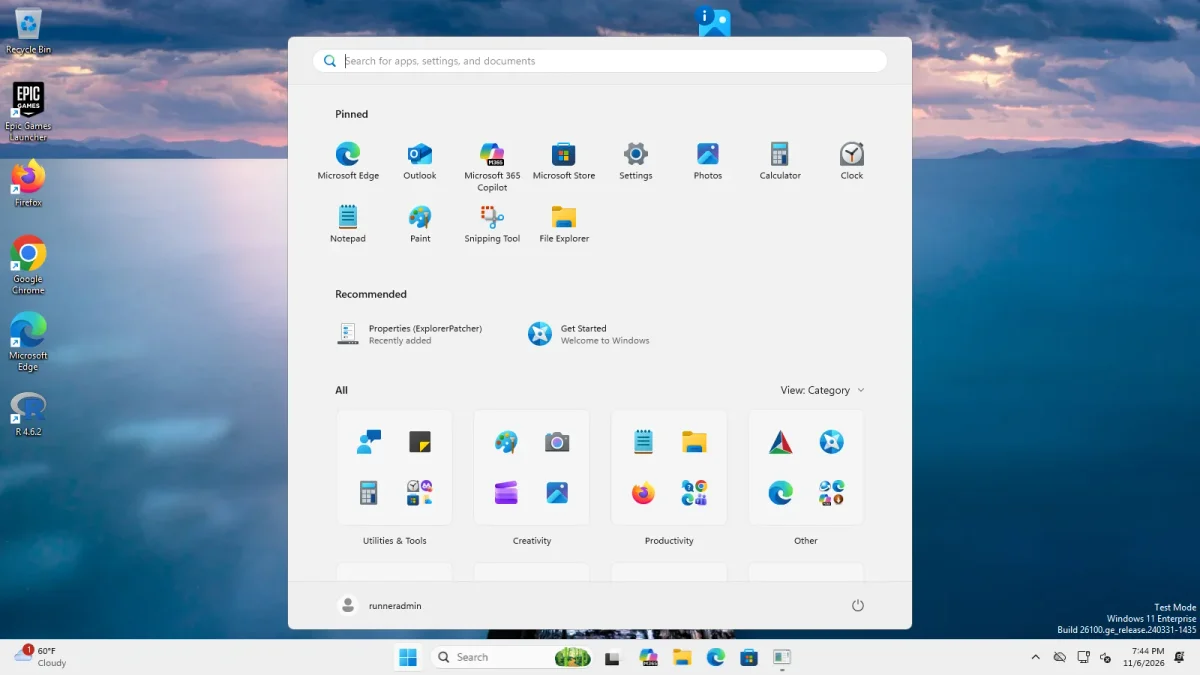
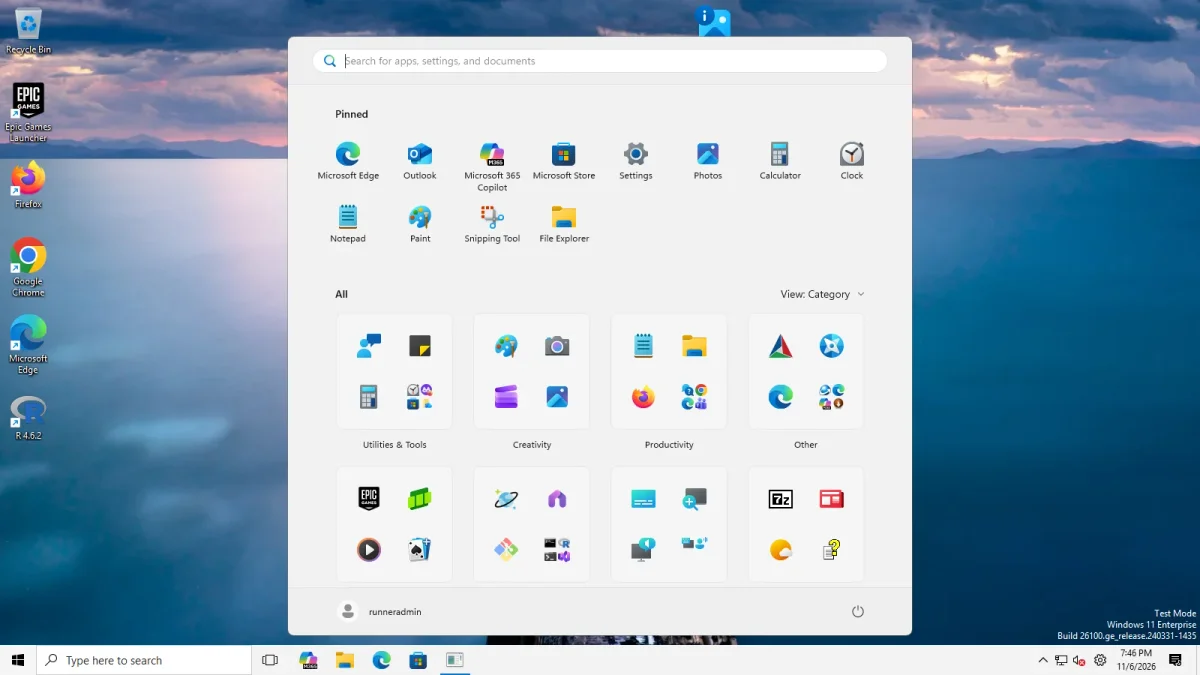
The tile groups differ per machine because each image has different apps: a Windows Server group on the Server image, a Productivity group with Microsoft 365 Copilot and Microsoft Store on the Arm64 image.
We did not test: an existing profile with many pinned tiles, drag and drop of tiles, Pin to Start, full screen Start, a second monitor, or the Start menu on a physical PC.
What changed in 2026: the tile engine story
The Windows 10 Start menu draws its tiles with code inside Windows. In May 2026 Microsoft removed that code from new builds. This is the sequence, from upstream’s issues and release notes and our own status data.
| Date | What happened | Source |
|---|---|---|
| 15 May 2026 | Windows 11 build 26220.8474 (Beta) removes the tile engine. EP 69.6 starts crashing Explorer in a loop. | Issue 4957, closed 30 May, 184 comments |
| 16 May 2026 | “[26xxx.8474+] Windows 10 Start menu is no longer available” is opened. | Issue 4960, closed, 115 comments |
| 19 May 2026 | EP 70.1 stops the crashes by hiding the Windows 10 Start option. | Release 70.1 |
| 10 Jun 2026 | EP 70.2 brings the option back with a tile layout engine ExplorerPatcher built itself. Upstream’s notes call it a partial restoration and say tiles can overlap. | Release 70.2 |
| 10 and 11 Jun 2026 | After the June security update users report the option missing on 24H2 (KB5094126) and pinned items gone. | Issue 5031, issue 5039, both closed |
| 20 Jun 2026 | EP 70.3 mitigates new breakage in 25H2 experimental builds and keeps pinned tiles after repeated crashes. | Release 70.3 |
| 15 Jul 2026 | A pre-release (70.4) freezes Start when you drag a tile pinned by dragging. | Issue 5111, closed 29 Oct |
| 29 Oct 2026 | EP 71.1 adds many Windows 10 Start menu, Alt+Tab and Win+X fixes for Arm64 and keeps up with builds 26100.9343+, 28000 and 29xxx. | Release 71.1 |
Our own run on 6 Nov 2026 with 71.1 is the newest entry on the status page: the Windows 10 Start menu opened on the newest runner images. That is one data point on two machines. A Windows update can change the result, so check Build Checker and status before you update Windows.
Start menu settings that matter
These live in Properties, Start menu. Names are as the app shows them. Each links to our Start menu settings list.
| Setting | Choices | Applies to | What we saw |
|---|---|---|---|
| Start menu style * | Windows 11 (default), Windows 10 | Both | Windows 10 opened on both machines |
| Position on screen | Center (default), At screen edge | Windows 11 Start tested | With the Windows 11 Start menu, At screen edge moved it to the left on both machines (start-left photos). We did not test it with the Windows 10 Start menu, which opened in the middle in every photo above. |
| Maximum number of frequent apps to show | None to Unlimited, 6 (default) | Both | Not tested |
| When using multiple displays, open Start on this monitor when invoked using the keyboard | Primary monitor (default), Monitor containing the cursor, numbered monitors | Both | Not tested; we had one monitor |
| Disable the “Recommended” section | On, Off | Windows 11 Start | Worked on Server 2025 (24H2 shell); not demonstrable on the 25H2 Arm64 client (see below) |
| Open Start in All apps by default | On, Off | Windows 11 Start | Worked on Server 2025 (24H2 shell); not demonstrable on 25H2 Arm64 (see below) |
| Show more tiles | On, Off | Windows 10 Start | Not tested |
| Corner preference | Not rounded, rounded floating, rounded docked | Windows 10 Start | Not tested |
| Display mode | Default, Start menu, Full screen Start | Windows 10 Start | Not tested |
Two Windows 11 Start switches
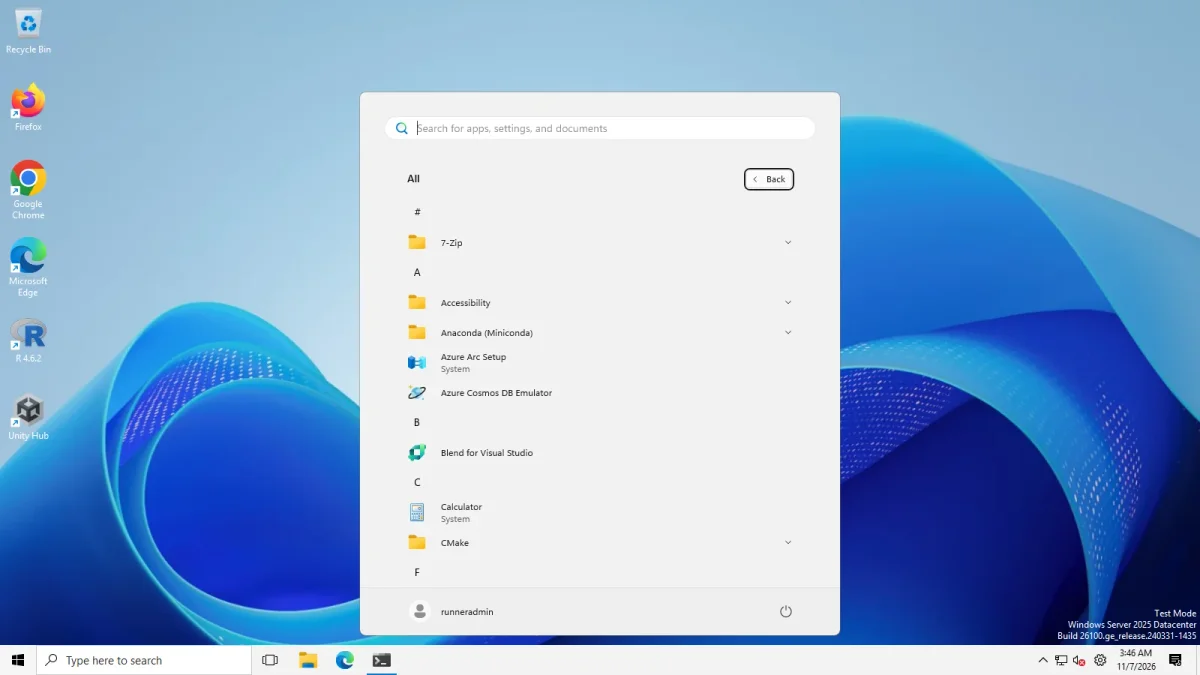
Open Start in All apps by default worked on Windows Server 2025 (24H2 shell). With it off, Start opens on the Pinned page with a Recommended block. With it on, Start opens on the alphabetical All apps list, with a Back button where the “All” button was. The value lives in HKCU\Software\Microsoft\Windows\CurrentVersion\Explorer\StartPage, not in ExplorerPatcher’s own key.
On our Windows 11 25H2 Arm64 machine we could not demonstrate it. The new Windows 11 Start layout there already shows the pinned apps and the full All list on one page, so the default photo and the photo with the option on look the same. ExplorerPatcher’s own data says the option is hidden when the new redesigned Start menu is active.
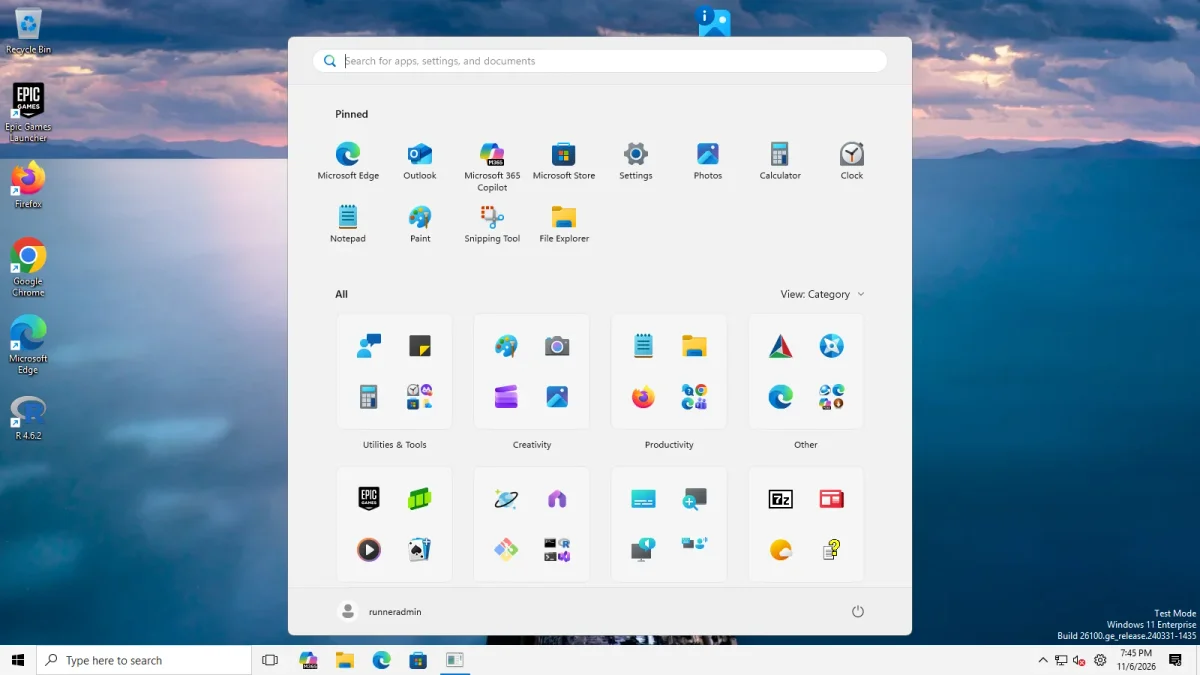
Disable the “Recommended” section worked on Windows Server 2025 (24H2 shell). With the option off, Start shows a Pinned block and a Recommended block. With it on, the Recommended block is gone and only the Pinned block is left. The option is stored in HKCU\Software\Microsoft\Windows\CurrentVersion\Explorer\ExplorerPatcher. Our first test wrote the value to the wrong key and saw no change. The re-run with the right key did.
Option on: no RecommendedDefault: Recommended shown 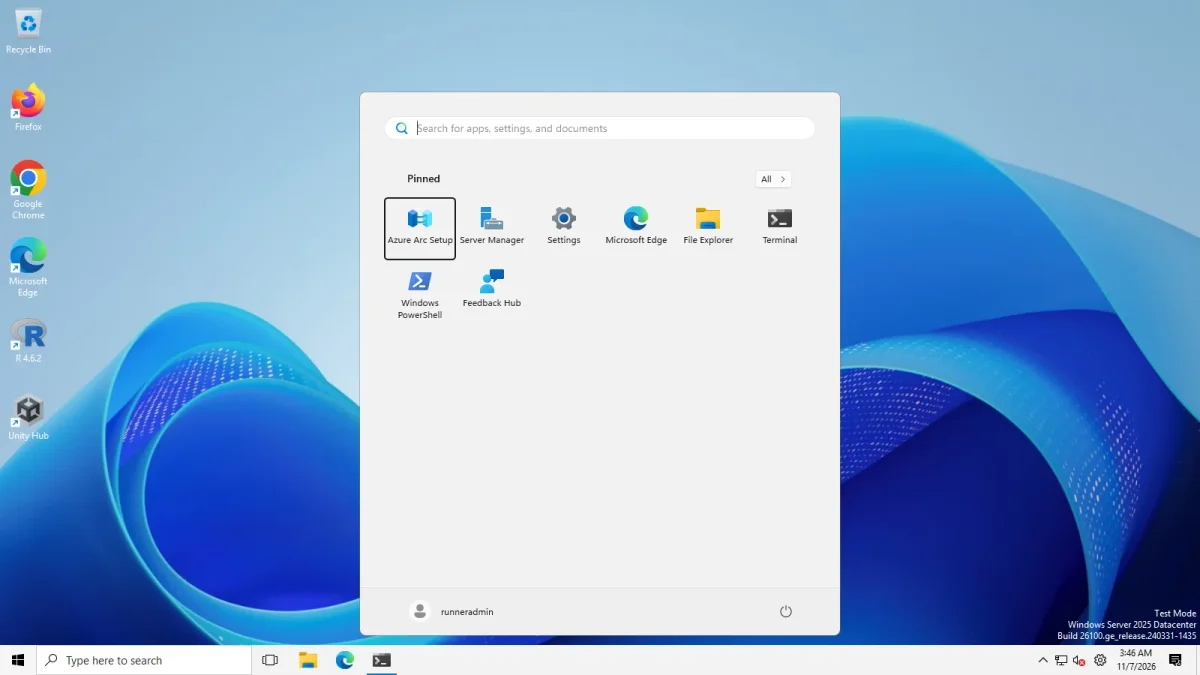
Windows 11 Start on Windows Server 2025 (24H2 shell), Disable the Recommended section off and on · Windows Server 2025 (24H2 shell), x64 26100.33674 · EP 71.1
On the 25H2 Arm64 client we could not demonstrate it. The photo with the option on shows Pinned and All with no Recommended block, but so does the default photo taken with the ExplorerPatcher taskbar. A third default photo, taken with the Windows 11 taskbar, does show a Recommended block with two entries (Properties (ExplorerPatcher), Recently added, and Get Started). So the client’s Start can show a Recommended block, and our two photos without it do not prove the option removed it. We did not take a “before” and “after” pair with the same taskbar on the client.
Known limits
Upstream says the Windows 10 Start menu is a partial restoration. These are the limits reported by users. We have not reproduced them. Status is as of 6 Nov 2026, read from GitHub.
| Limit | Upstream report | State |
|---|---|---|
| Tile problems; upstream says tiles can overlap | 5121 “Windows 10 start menu tiles issue” | Open |
| Tile sizes limited to small and medium on 25H2 | 5160 | Closed |
| Pin to Start does nothing after a Windows update | 3984, upstream FAQ; fixed in releases 65, 68 and 71 according to our issue notes | Closed |
| The App list setting “Show” behaves like “Hide” | 5223 | Open |
| Windows 10 Start does not open, only the Windows 11 one | 5143 | Open |
| Full screen Start is mispositioned across monitors | 5137 | Open |
| Search box disappears when Start or Search opens | Upstream FAQ: Windows 11 changed Search, so use the search icon or hide it | By design |
If Start does not open at all, go to Start menu not working. If a Windows update broke things, check the status page and Windows 11 25H2.
Other options
| Tool | What it does for Start | Price (from our alternatives list) |
|---|---|---|
| Open-Shell | A classic Start menu replacement, plus classic File Explorer additions. It does not change the taskbar. | Free, MIT |
| StartAllBack | A Windows 10 or Windows 7 style Start menu, taskbar, ribbon and context menu | Paid; third-party reviews quote about $5 per PC, which we did not verify |
| Start11 | Stardock’s Start menu and taskbar replacement with Windows 7 and Windows 10 styles | Paid; current prices not shown on the pages we checked |
We ran all three on our Windows Server 2025 test machine (24H2 shell), one at a time, and not on the Windows 11 Arm64 machine or a physical PC. Start11 was a partial test: we installed its trial, but its first-run dialog stayed unanswered, so we never saw its Start menu. Read the results in ExplorerPatcher vs Open-Shell, vs Start11 and vs StartAllBack, or use the alternatives chooser.
Common questions
Does the Windows 10 Start menu still work on Windows 11 25H2?
Yes with ExplorerPatcher 70.2 or later. It opened on our Windows 11 25H2 Arm64 machine with version 71.1. Upstream calls the restoration partial because Microsoft removed the original tile engine, and tiles can overlap.
Why did the Windows 10 Start option disappear in May 2026?
Windows 11 build 26220.8474 removed the tile engine and made older ExplorerPatcher versions crash Explorer in a loop. Version 70.1 stopped the crashes by hiding the Windows 10 Start option, and 70.2 brought it back with a new engine.
Can I use the Windows 10 Start menu with the Windows 11 taskbar?
Yes. We opened it with both taskbar styles on both machines. The taskbar style and the Start menu style are separate settings.
Are live tiles live?
We have not tested that. Our machines are fresh installs and the tiles in our photos are the default ones, so we cannot say whether tiles update. Do not assume they do.