Start menu or search not working with ExplorerPatcher
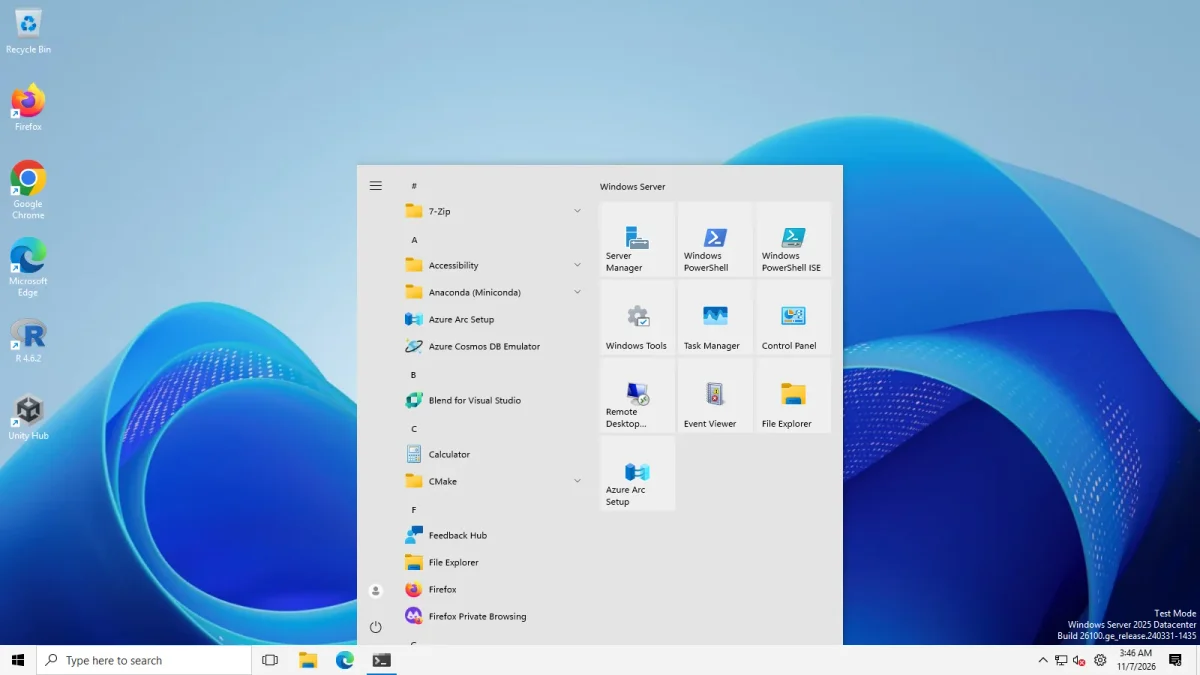
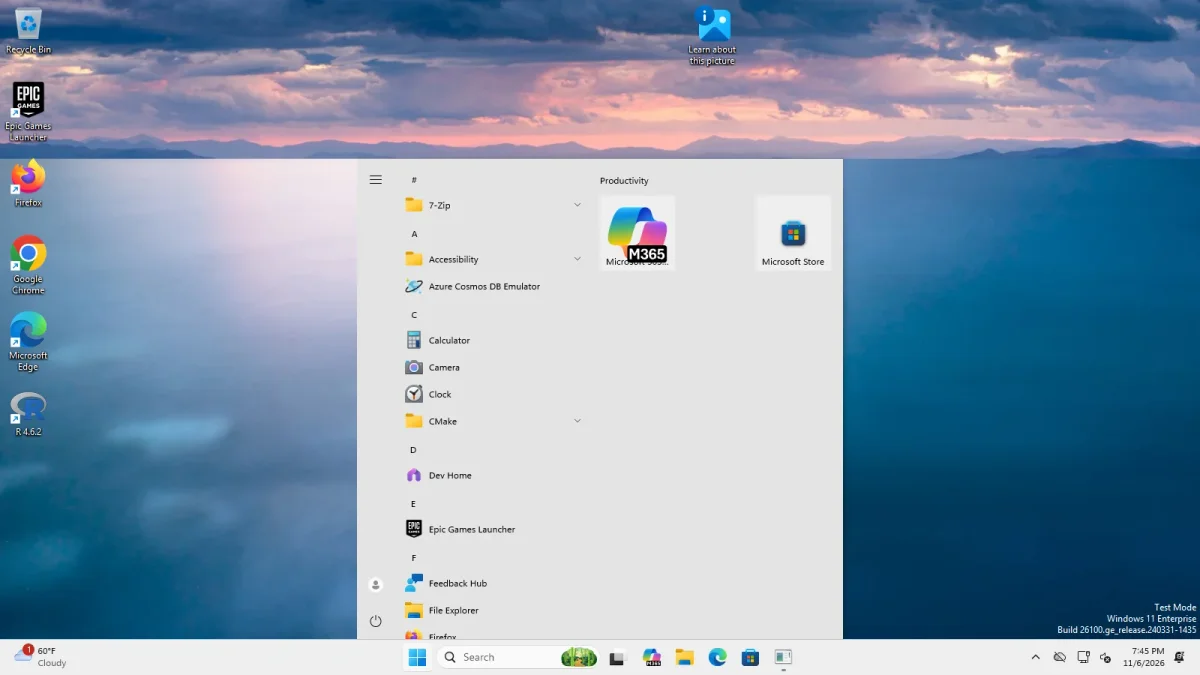
Update ExplorerPatcher to 71.1 first. Windows builds 26xxx.8474 and later (May 2026) removed the code behind the Windows 10 Start menu, and ExplorerPatcher 70.2 and later rebuilt it, which upstream calls a partial restoration. In our tests the Windows 10 Start menu opened with both taskbars on Windows Server 2025 and Windows 11 25H2 Arm64.
Checked against ExplorerPatcher 71.1 (26100.9711.71.1) on Windows Server 2025 (24H2 shell) 26100.33674 and Windows 11 Enterprise 25H2 26200.9725 · Nov 6, 2026On this page
What to do
- Update to version 71.1 from GitHub. The Windows 10 Start menu fixes of 2026 are in it. Updating means running the new setup over the old one, and our test kept the settings.
- Check what you actually have. If you chose the Windows 10 Start menu on a Windows 11 build from 26xxx.8474 on, it is ExplorerPatcher’s rebuilt version, not Windows’ own. Upstream says it is a partial restoration and tiles can overlap.
- If Start does not open at all, start Explorer without ExplorerPatcher (black screen guide), open Properties (search Start for “Properties (ExplorerPatcher)”), choose Start menu and set Start menu style to Windows 11 (default). Restart File Explorer.
- If the search box vanishes, use the search icon on the taskbar. There is no other fix (see below).
- Check the status page for your build, in case a Windows update has broken Start.
History: the 26xxx.8474 tile engine change
This is what upstream’s issues and release notes say. We could not reproduce the old breakage because our machines run the fixed version.
| Date | Event | EP version |
|---|---|---|
| 15 May 2026 | Windows build 26220.8474 (Beta) removed the tile engine behind the Windows 10 Start menu and made EP crash Explorer in a loop (issues 4957 and 4960) | 69.6 |
| 19 May 2026 | EP stopped the crashes by hiding the Windows 10 Start option | 70.1 |
| 10 Jun 2026 | EP restored the option with its own tile engine; upstream calls this partial | 70.2 |
| 10 Jun 2026 | After the 10 June 2026 Windows update, a user found Start’s pinned items replaced by “Productivity” apps on 24H2 (issue 5039, closed 6 Jul 2026) | 70.2 |
| 15 Jul 2026 | Dragging a tile that was pinned by dragging froze Start on 26200.8655 (issue 5111, closed 29 Oct 2026) | 70.4 pre-release |
| 29 Oct 2026 | Start menu fixes for Arm64 builds, a fix for memory corruption when pinning and unpinning a tile, and more | 71.1 |
An earlier case: upstream’s issue 3667 reported that the Windows 10 Start style did not work on builds 226xx.4169 and later; it closed on 3 Nov 2024.
Pin to Start does nothing
Upstream’s FAQ: if “Pin to Start” does not work in the Windows 10 Start menu, Microsoft changed something in the code, and ExplorerPatcher needs an update to fix it. Upstream issue 3984 (“Pin to Start” on 22631.4541+ and 26100.2454+, closed 21 May 2025) is an example. The 71.1 notes list a memory-corruption fix for pinning and unpinning tiles and the Arm64 Pin and Unpin commands. Update, then test again. If it still fails on your build, report the build number upstream.
The search box disappears
Upstream’s FAQ: Microsoft changed Search in Windows 11, so the code the search box relied on is gone. Search always acts as if the box were off, so the box disappears when Start or Search opens. The workaround is to use the search icon or hide the search icon.
In our test, “Show search box” on ExplorerPatcher’s taskbar produced the wide “Type here to search” box, so the box itself exists. The disappearing happens when Start or Search opens, which we did not test.
Windows key or Start button does not respond
We have no tested fix for this. The causes we can document are the crash counter having switched ExplorerPatcher off, a Windows update that moved the code ExplorerPatcher patches, and the Windows 10 Start menu option on a build whose engine is missing. Try the steps above, and look at the open upstream reports:
- Issue 5238 (open, 6 Nov 2026): “StartDocked symbols can never resolve on 26200.9711 …”. Our Arm64 machine runs 26200.9725, and Start opened normally there, but our test does not cover that report.
- Issue 5223 (open, 1 Nov 2026): Windows 10 Start menu “App list” set to Show behaves as Hide.
- Issue 5032 (open, 10 Jun 2026): a blank screen when closing the Start menu.
These are titles and states from the issue tracker. We have not reproduced them.
When Start is broken by the Start menu host files
The installer places ExplorerPatcher’s loader (dxgi.dll) in the Start menu host folder and a few helper files for the Windows 10 Start menu (StartUI_.dll, JumpViewUI_.dll, wincorlib.dll copies), as we saw in our install test. Because ExplorerPatcher touches system app folders, use the uninstaller rather than deleting files by hand. See the uninstall guide.
Common questions
Why is the Windows 10 Start menu option missing?
Windows builds 26xxx.8474 and later removed the tile engine behind it. ExplorerPatcher 70.1 hid the option to stop crashes, and 70.2 and later brought it back with ExplorerPatcher's own tile engine. If it is missing, update to 71.1 and check that your build still contains the menu.
Why does Pin to Start do nothing in the Windows 10 Start menu?
Upstream's FAQ says Microsoft changed internal code, and ExplorerPatcher must be updated for each such change. Releases 65, 68 and 71 contain Pin to Start fixes, so update first. Upstream issue 3984 covered the 2024 builds and closed on 21 May 2025.
Why did the search box disappear when I open Start?
Upstream's FAQ says Windows 11 changed how Search draws its box, so it always acts as if the box were off. The only workaround it names is to use the search icon, or to hide the search icon.
Did the Start menu work in your tests?
Yes, with limits. The Windows 10 Start menu opened with both the Windows 11 and the ExplorerPatcher taskbar on Windows Server 2025 and on Windows 11 25H2 Arm64. We did not test pinning, unpinning, dragging tiles or search results.